
How traxy works: the full LinkedIn GTM workflow, step by step
Every step of traxy, from social intent to outreach on autopilot: where leads come from, the 50%+ ICP match, enrichment, campaigns, research on each lead, sequences, approval and the limits.
traxy runs your entire LinkedIn GTM end to end, from finding high intent leads from social intent to enriching and researching each one, to running relevant, personalized LinkedIn and email outreach to them on autopilot. You approve a campaign once and it runs from your own connected accounts, or you approve every message.
This guide covers every step: what you set up, what traxy does, and where the limits are. It is for founders, sales and GTM teams and agencies at B2B companies of any size. Product details come from the traxy docs and the product as of November 2026.
The workflow at a glance
traxy works in seven steps. Run them by hand in the app, through trax (the agent inside traxy), or from Claude, ChatGPT, Codex, Cursor or Grok through the traxy MCP.
- Social intent. People who post, comment and like on LinkedIn about your topics, your profile viewers, and engagers with competitors, creators, company pages or one post. Or search 71M+ scanned LinkedIn likes, posts and comments.
- 50%+ ICP match. Only people with a 50% or higher match to your ideal customer profile (ICP) become leads, each with the activity behind it.
- Enrich. traxy looks up work emails and phone numbers.
- Campaigns. Leads go into campaigns by signal, audience or offer, and many run at once.
- Research, filters and grouping. Each campaign researches every lead for the facts you choose, filters out who doesn’t fit and groups the rest.
- Personalized sequences. traxy prepares LinkedIn and email sequences from that research.
- Outreach on autopilot. You test on sample leads and approve the launch, then it sends from your own accounts. Or you approve every message. Replies, unsubscribes and bounces stop the sequence.
Before you start: tell traxy who you sell to
- You set up: your company website, then corrections to the ICP and signals traxy drafts.
- traxy does: drafts your Lead criteria and Signals from the website and shows a lead preview so you can judge the targeting.
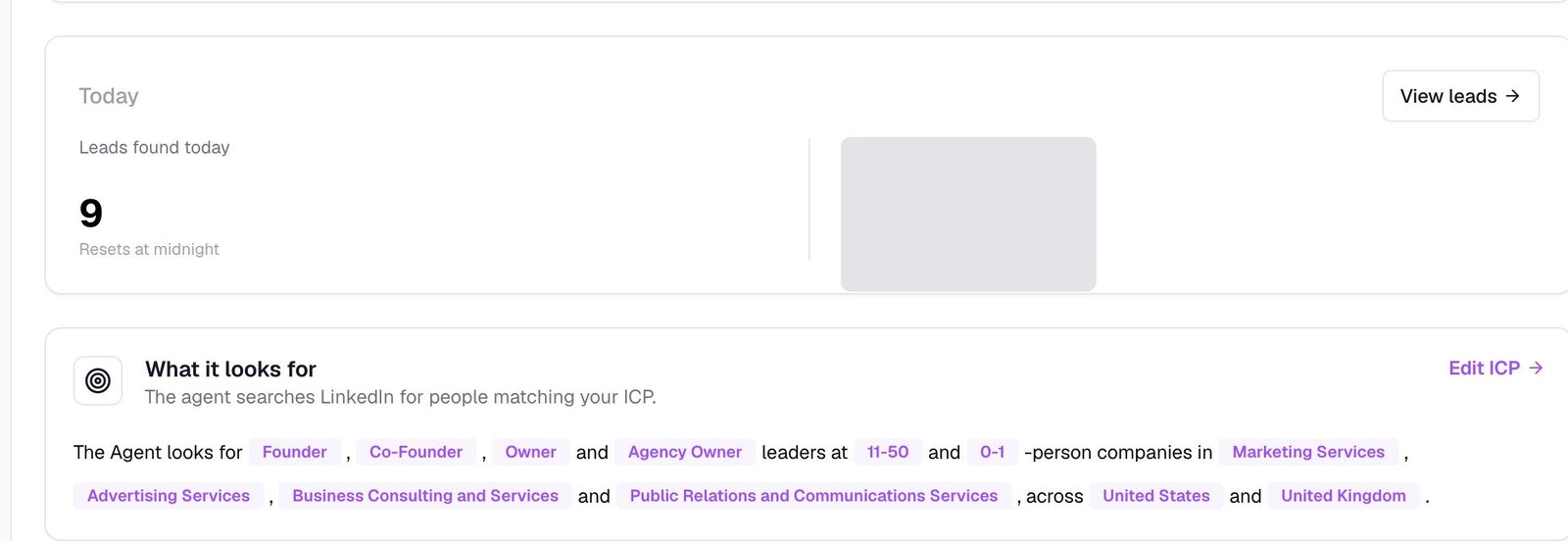
Enter your company website and confirm the company context. traxy drafts your Lead criteria (your ICP) and Signals (the topics that make someone relevant). You fix anything that’s off, approve, and review a lead preview.
Lead criteria: who fits
Under Targeting > Lead criteria you describe people by role, department, seniority and location, and companies by size, industry, revenue, funding and keywords, with exclusions where needed.
Be specific: “sales leaders at software companies” beats a long list of unrelated titles. If you change the criteria later, traxy can check your active leads and offer to move the ones that no longer match to Done. Nothing moves until you confirm.
Signals: what makes someone relevant
The Signal Brief, under Targeting > Signals, lists the buyer pains, product mentions, triggers and keywords connected to your offer. You review suggested topics before saving, and can describe a custom signal in plain English, such as “companies expanding into a new market and looking for an agency.”
Lead criteria say who fits; signals say what evidence you want. A relevant post doesn’t make someone a lead if they don’t fit. Docs: Quickstart, Lead criteria and Signals.
Step 1: where do the leads come from?
- You set up: which sources to use (your signals, profile viewers, the profiles, posts and company pages you track, or a plain-English search).
- traxy does: finds the people behind that LinkedIn activity and passes them to qualification.
traxy finds high intent leads from social intent: what people post, comment and like on LinkedIn, who views your profile, and who engages with the people and pages you choose. Use any mix of these six sources.
Posts, comments and likes about your topics
Discovery runs look across LinkedIn activity for people who fit your ICP and engage with your Signal Brief topics. Under trax > Discovery runs you see each run and its results, and can start one. Docs: Discovery runs.
Your profile viewers
Turn on Profile views on the LinkedIn activity card in Targeting > Signals. Then filter your leads under Leads > Filters > LinkedIn activity by “Viewed any profile” or “Viewed [your name]’s profile,” for any time or the last 7, 30 or 90 days. Save that as a shared view and a campaign can reach the viewers who fit. LinkedIn doesn’t reveal private-mode viewers, so traxy can’t either. More in profile views to leads.
Your own posts
Add your own LinkedIn profile under Targeting > People and traxy qualifies the people who like and comment on your posts. Teammates’ profiles work the same way.
Competitors, creators and influencers
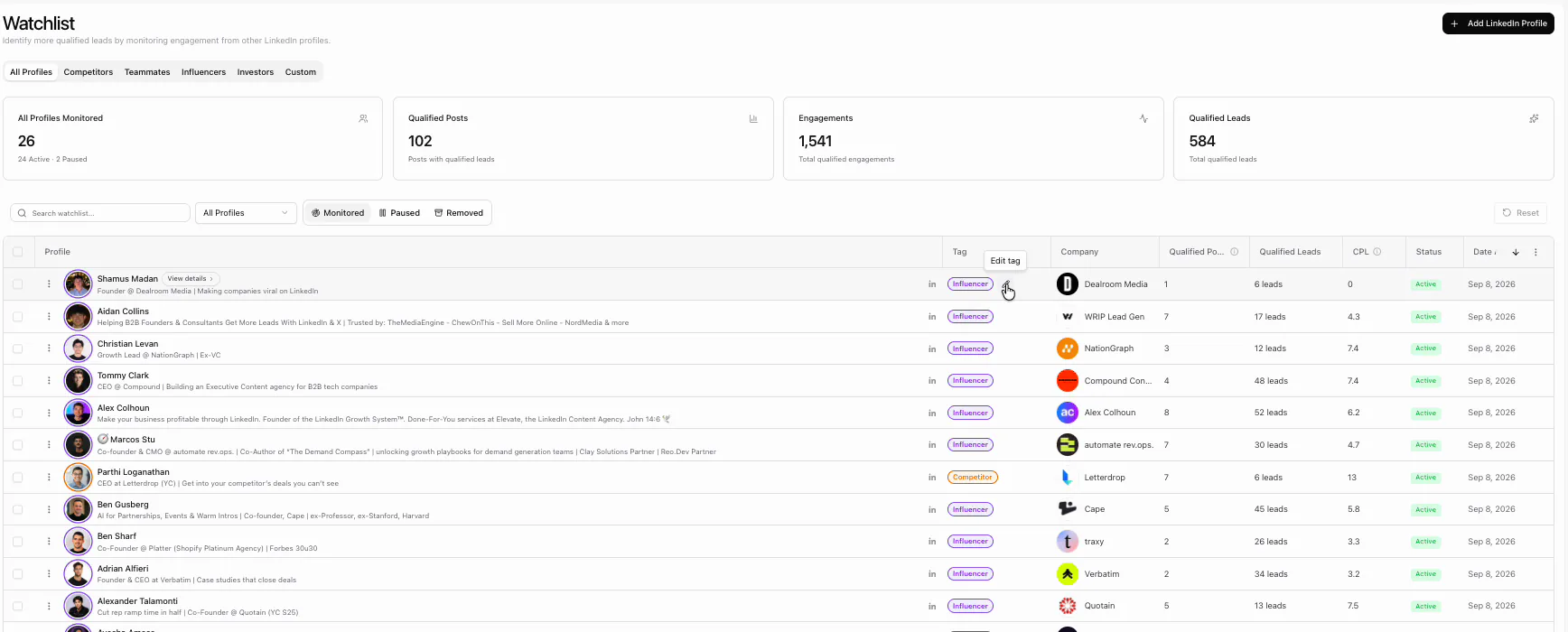
Track any LinkedIn profile with a relationship tag: competitor, teammate, influencer, investor or custom. traxy checks its recent posts, then follows new posts published after you added it, and qualifies the people who engage. Ongoing monitoring covers the five most recent of those posts for each active tracked profile. For an older post, track the post by URL. Each profile shows the leads it produced, so you keep the ones that work. See leads from competitor posts and who to track on LinkedIn.
Company pages
Track a company by its domain or LinkedIn company page under Targeting > Companies. traxy reads the page’s posts and keeps the engagers who fit. It finds people engaging with those posts, not every employee, which suits account-based work. More in company page engagers as leads.
A single post URL
Paste any LinkedIn post URL (yours, a competitor’s or an influencer’s) under Targeting > Posts > Track post, or paste it into trax and ask for its audience. Before you confirm, traxy shows how many people it will evaluate; that is not a promise of that many leads. See leads from a LinkedIn post and Tracking in the docs.
The social intent database
Social Intent Search searches 71M+ scanned LinkedIn likes, posts and comments from a plain-English request, such as “founders in the US looking for help with LinkedIn outbound.” Every result shows the person, the post or comment behind them and their fit. Search in the app, through trax or from your AI chat, then send the people into a campaign. Ben, traxy’s co-founder, asked it to “find me leads that need outbound tools based on social intent” and got 210 leads from one prompt.
Finding the leads is half of the job. traxy also runs LinkedIn and email outreach to the leads it finds, from your own connected sender accounts, once you approve the campaign. Steps 4 to 7 below show how, and LinkedIn outbound has the details.
Step 2: how does traxy decide who is a lead?
- You set up: nothing new. Your Lead criteria and Signals drive this step, and your feedback sharpens it.
- traxy does: scores each person against your ICP, keeps only the 50%+ matches, labels the evidence and attaches the source activity.
A person becomes a lead only with a 50% or higher ICP match; engagement alone is not enough. Every lead also carries the evidence that put it on your list.
The ICP match score
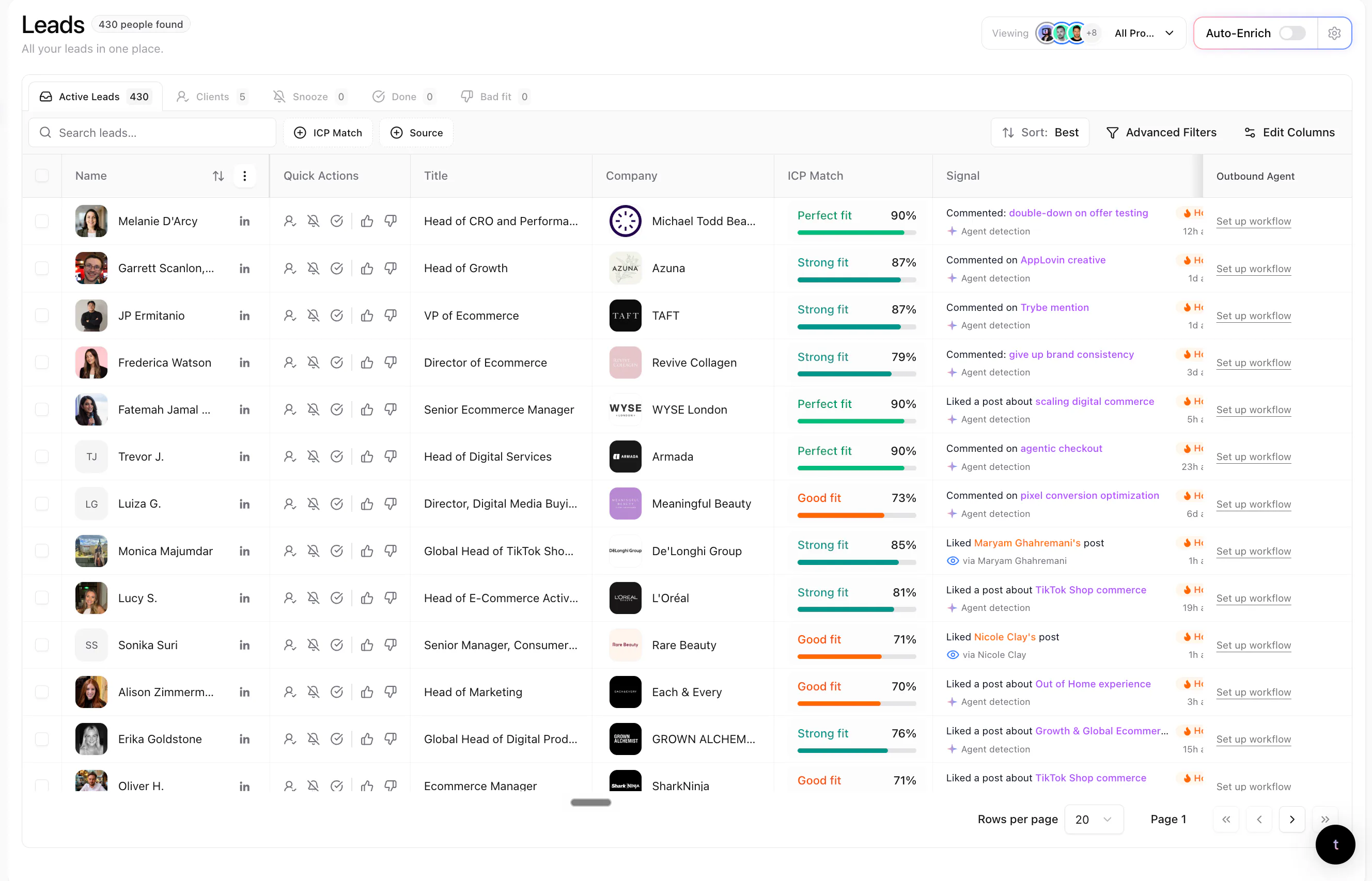
Every person gets an ICP match score against your Lead criteria, and 50% or more qualifies. Filtering to a higher band narrows what you see without changing the rule. The score measures fit, not the probability that someone will buy.
Signal labels: how strong the evidence is
- Warm: a direct signal relevant to your offer.
- Related: contextual evidence related to your offer.
- Activity: observed activity with a weaker connection to your offer.
- ICP match: a good fit with no recorded signal of the other types.
The label describes the evidence and the ICP match describes the person. Check both.
The source behind every lead
A lead’s Signals tab shows the post, comment, like, repost or profile view behind it, with the date and a source link. Check it before you use it in a message. Several signals on one person still make one lead.
Your feedback
Mark a lead Good fit or Bad fit with a reason to record your judgment. Done, Snooze and Client organize work without changing fit. The Blocklist keeps company domains, such as existing customers, out of discovery, and Do not contact stops outreach to specific emails or LinkedIn profiles.
A person counts against your plan’s lead capacity once, when first delivered as a qualified lead. Docs: How qualification works. For the Signals screen in depth, read how traxy decides who counts as a lead.
Step 3: how does traxy enrich leads?
- You set up: which leads to look up, or Auto-Enrich with the contact types you want.
- traxy does: finds a verified work email and a phone number, and saves them on the lead.
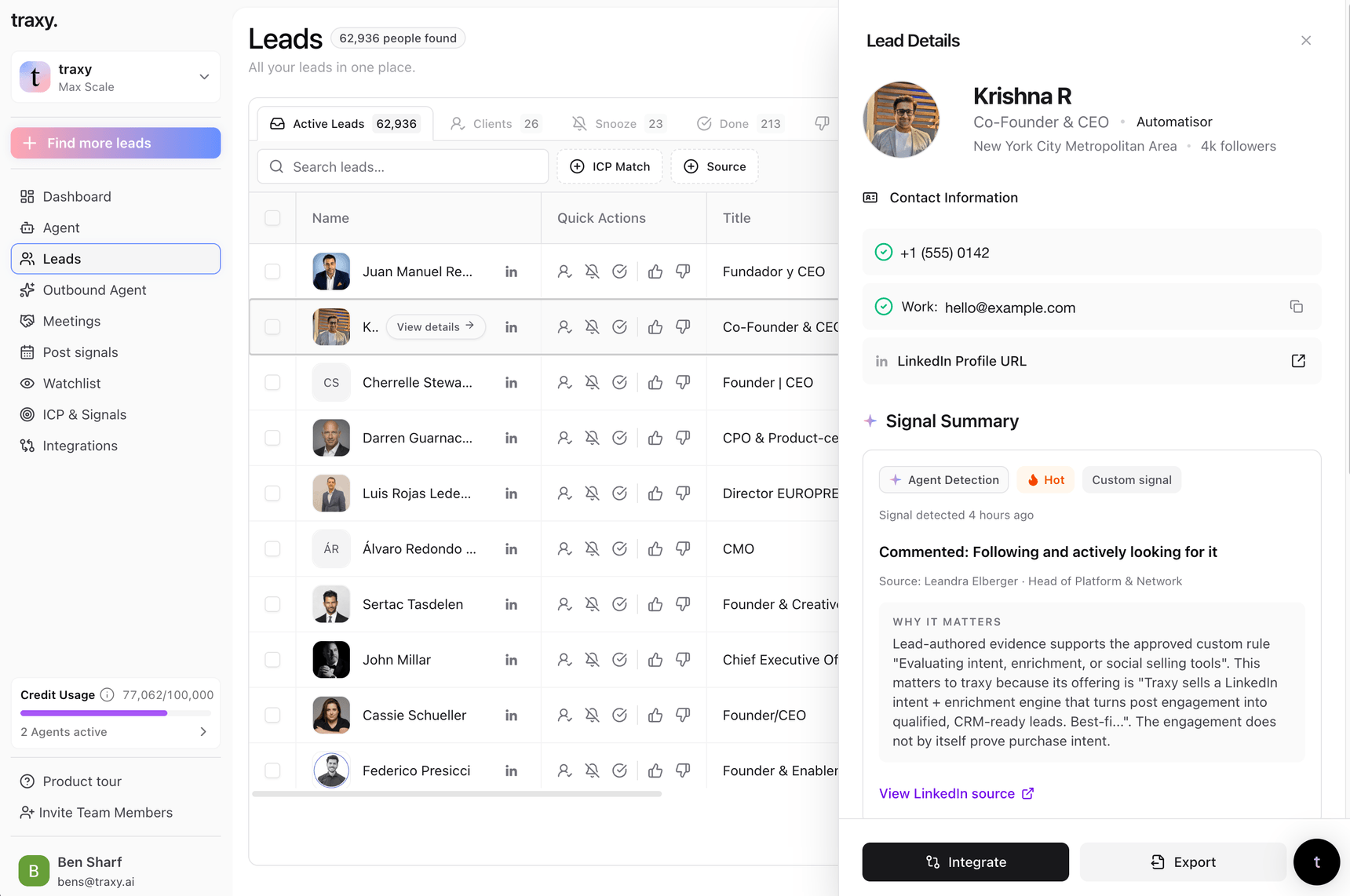
Email lookup finds a verified work email. Phone lookup finds a phone number and needs the phone add-on or a plan that includes it.
Auto-Enrich looks up the contact types you pick for every newly qualified lead; it doesn’t backfill older leads. If you already have someone’s details, ask trax to save them; enrichment won’t overwrite them.
A lookup doesn’t guarantee a result, and lookups don’t use lead capacity. Docs: Contact details.
Step 4: organize leads into campaigns
- You set up: a shared lead view as the audience, the offer, and the outcome you want.
- traxy does: turns that into a campaign plan, asks about anything missing, and keeps every lead in one campaign at a time.
A campaign is one audience, one offer and one plan for research and outreach. Run many at once on different signals: profile viewers in one, competitor engagers in another, people hiring for a role in a third.
Build the audience with a saved view
Campaigns use shared lead views. In Leads, filter by people, companies, signals or workflow state, then Save as new view and share it. A view keeps the filters, not a frozen list, so new matching leads join it. Docs: Filter and save audiences.
Create the campaign
Open Outbound > Campaigns > Create campaign, or ask trax, and describe the audience, offer, outcome and research. For example: “Use our shared founder view. Research how each company handles outbound, then draft a short LinkedIn introduction based on the evidence.” traxy turns that into a plan and asks about gaps. Docs: Create a campaign.
Priority between campaigns
Campaigns run in priority order. A lead goes to the first campaign it fits, and one lead is never researched or messaged by two unfinished campaigns at once. Pause or change any campaign at any time. Which plans include campaigns is on the pricing page. Docs: Manage campaigns.
Step 5: research on each lead, filters and grouping
- You set up: a research brief: the facts that would change your message, and what disqualifies a lead.
- traxy does: researches every lead for those facts before any message is prepared, filters out who doesn’t fit and groups the rest by signal.
This step makes the outreach relevant. Before any message is prepared, the campaign researches each lead, drops the leads the research doesn’t support and groups the rest by what it found.
Write a research brief
Ask for facts that change the message: what the company sells and to whom, a role it is hiring for, a tool it uses, whether it recently raised. Adam, who runs GTM at traxy, keeps the ICP matches engaging with a client’s content, researches each lead for a signal such as an ecommerce brand with 100k+ site visits running 50+ Meta ads, then personalizes the message from that research.
Filter and group
Leads that fail a research check are filtered out instead of getting a generic message. Each remaining group gets its own message variant. In Adam’s campaigns the signal picks the template: a lead hiring for a specific role gets one message, and a lead who posted 2+ times in 30 days gets another. You can also choose a lead’s campaign based on what the research found.
Signals beyond LinkedIn
Hiring, funding rounds, job changes, tech changes and custom signals come from this research on each lead, not a live event feed. Stack one on a LinkedIn signal: someone who commented about your problem and whose company is hiring for the role you help with. See hiring signals and signal-based outbound.
Research-only campaigns
A research-only campaign records the findings for each lead without preparing outreach. More in research agents for B2B sales.
Step 6: personalized LinkedIn and email sequences
- You set up: the steps and waits you want, your offer and proof, and the sender accounts to use.
- traxy does: prepares the LinkedIn and email sequence for each group, filled with each lead’s own signal and research.
Message variants
Each variant says when it is used, for example “latest post topic is found,” and fills in each lead’s own details, such as first name and latest post topic. If a detail is missing, traxy tries the next variant. Edit the plan in plain words and test again.
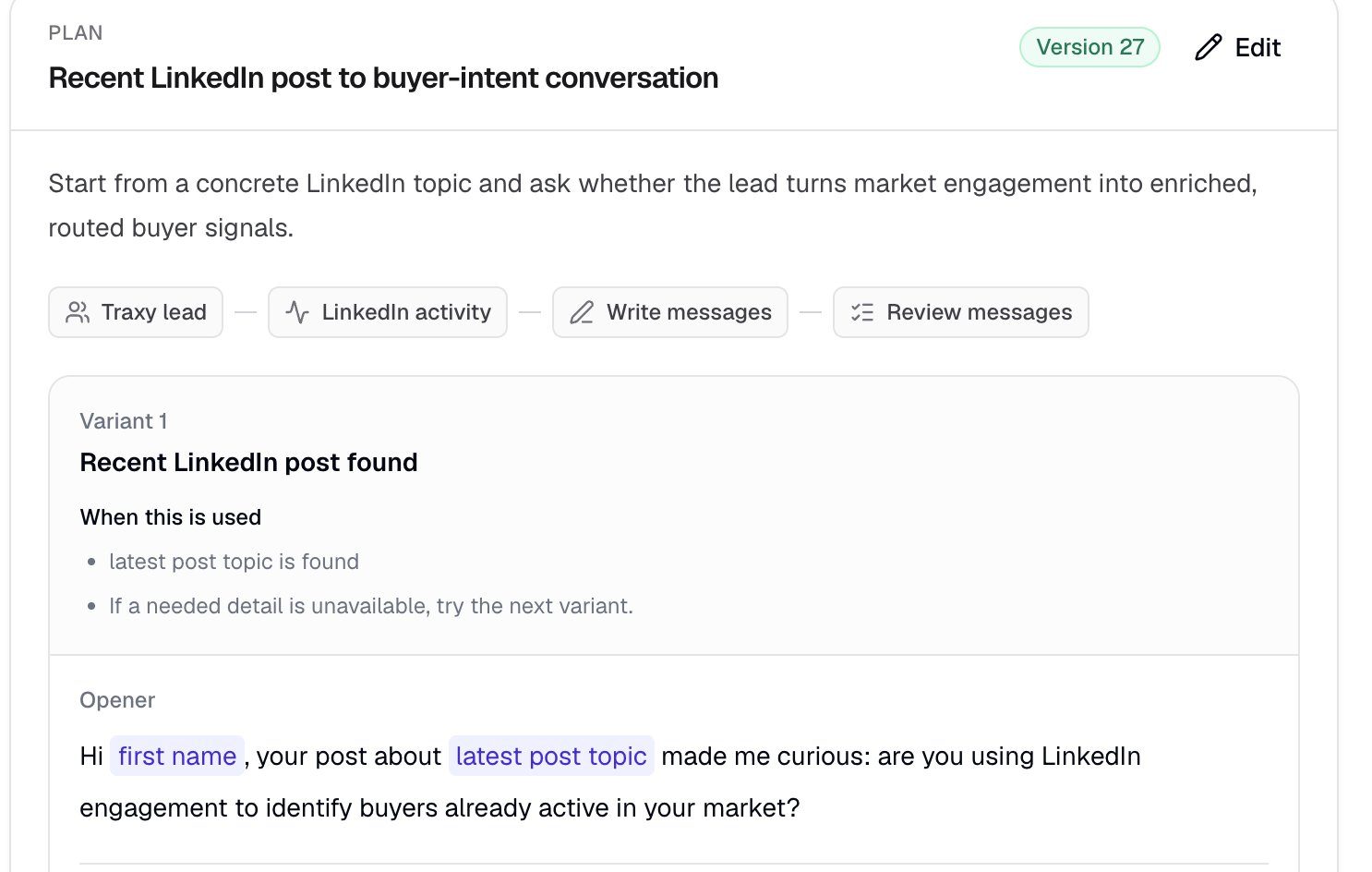
Steps across LinkedIn and email
A sequence can mix LinkedIn connection requests, LinkedIn messages and emails. Waits can depend on events, such as a connection being accepted. A lead is only ever in one active sequence at a time.
Sender accounts
Outreach sends from your own LinkedIn accounts and mailboxes, connected under Settings > Sender accounts. Each sender has its own limits, active hours and ramp-up, which a campaign can’t bypass. A LinkedIn and email sequence needs a sender with both channels connected. Docs: Sender accounts and Sequences and one-off messages.
For a single touch, send a one-off message, connection request or email to one lead; pressing Send is the approval. See also personalized cold email at scale and LinkedIn outbound.
Step 7: approval, and what “on autopilot” means
- You set up: a test on sample leads, the launch approval, and a delivery mode.
- traxy does: runs the approved campaign from your sender accounts, stops a lead’s sequence on a reply, unsubscribe or bounce, and puts every conversation in one inbox.
In traxy, “on autopilot” always comes after your approval. Nothing sends until you approve the launch, and you can approve every message as well.
Test on sample leads
Ask trax to test the plan. The test researches a sample of leads and prepares drafts, and nothing is sent. Check that the research supports each claim, look at skipped leads and missing evidence, and ask trax to revise the plan if needed.
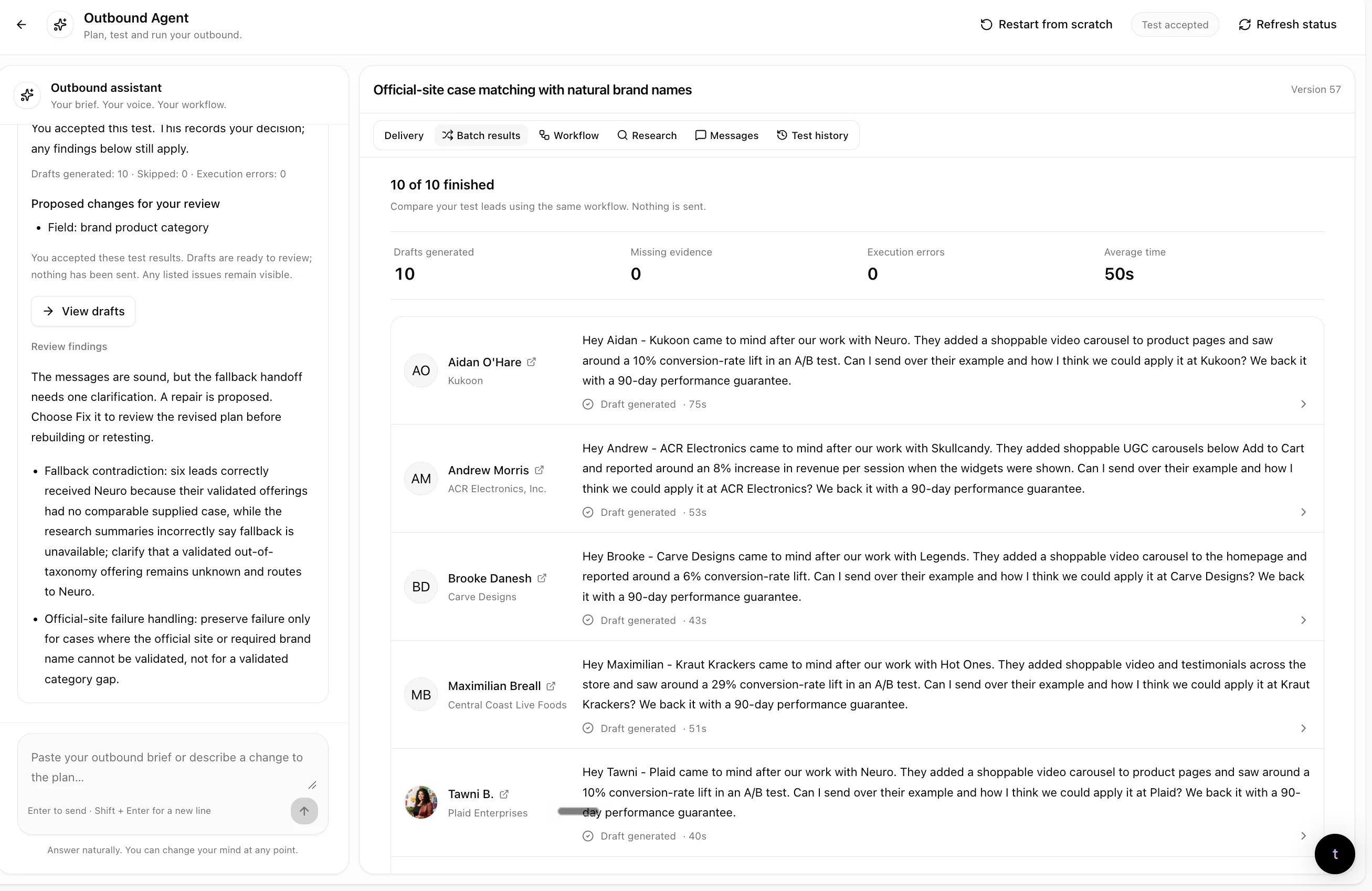
Review the launch
When you open Launch, traxy shows you:
- who will join the campaign;
- who is skipped because another unfinished campaign holds them, or because a completed campaign contacted them before;
- the sender or destination;
- the message steps;
- the delivery mode.
Confirming Launch is the campaign approval. Docs: Review and launch.
Choose a delivery mode
- Let the approved campaign send. The campaign runs on its own: leads in its audience are researched, matched to a variant and contacted from your sender accounts, within each sender’s limits.
- Approve every message. Each message waits in the campaign’s review queue until you choose Approve or Approve all.
What stops a sequence
Replies, unsubscribe requests and hard bounces stop a lead’s sequence. Pause a whole campaign at any time, or pause one lead from the Inbox and take over yourself. Pausing stops what comes next, not what already went out.
Replies land in one inbox
Outbound > Inbox keeps one conversation per lead across LinkedIn and email, and reply alerts can go to Slack. Connect Google Calendar and traxy lists meetings with traxy leads so you can record outcomes. Docs: Use Inbox and Meetings and outcomes.
Ways to run traxy: the app, trax, the MCP and the API
By hand in the app
Targeting holds Lead criteria, Signals and Tracking (people, posts and companies). Leads holds review, filters, views and enrichment. Outbound holds campaigns, the Inbox and meetings. Settings holds sender accounts, the Blocklist and Do not contact, and Insights shows which profiles and posts bring in leads.
With trax, the traxy agent
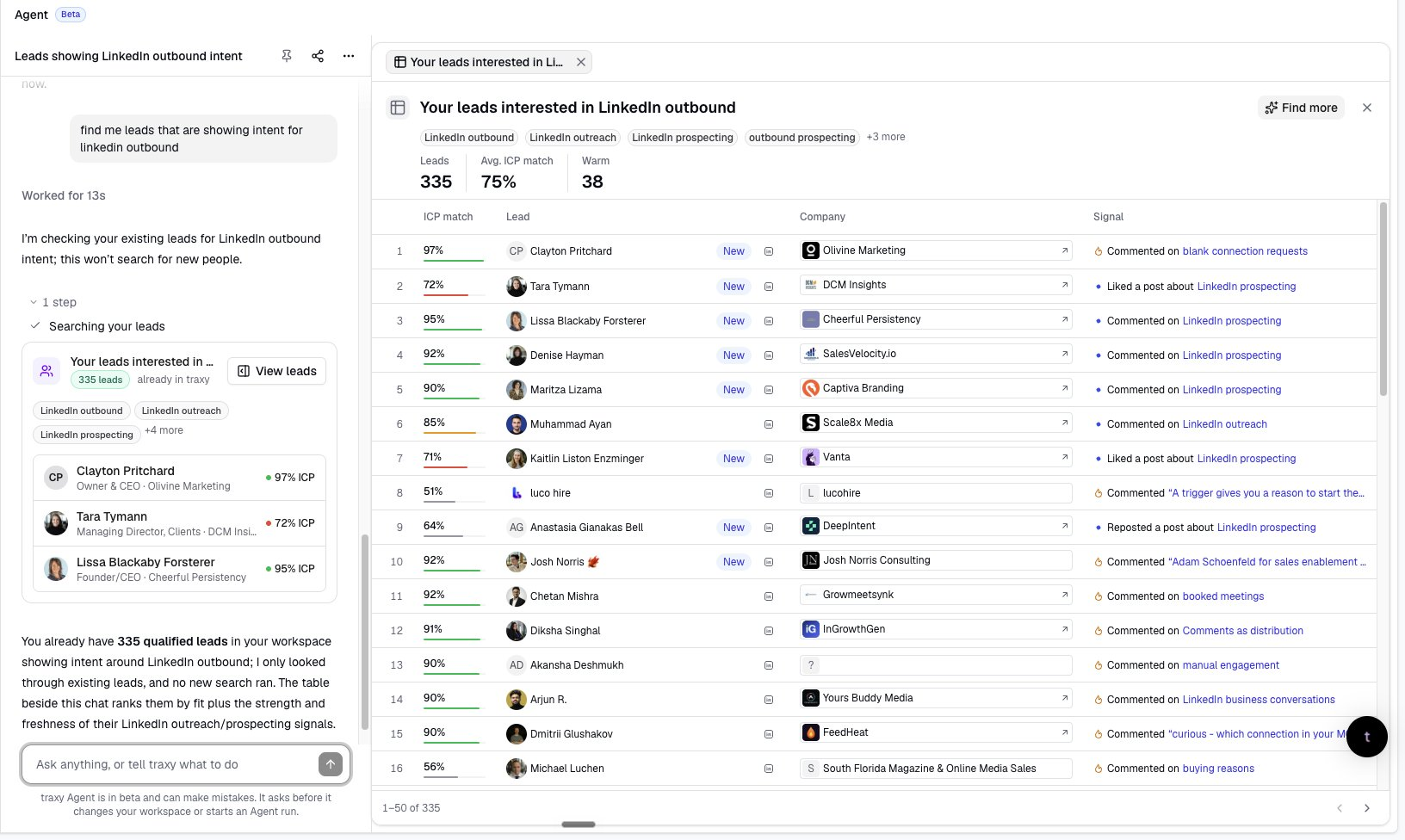
trax is one chat that runs the whole workflow. Ask it to “show me warm leads at software companies” (existing leads, no capacity used), to “find posts about hiring a first sales team,” or to find new founders discussing their first sales hires. It can change your ICP and signals, research leads, and build and test campaigns and sequences.
Anything that changes your setup, starts discovery or looks up contact details shows an approval card first. Lead lists and campaigns open beside the chat, and trax can send a daily brief in traxy or Slack. Docs: Work with trax.
From Claude, ChatGPT, Codex, Cursor or Grok: the LinkedIn GTM MCP
Every traxy customer can connect traxy to an AI client through the traxy MCP: open Integrations, pick your client, add https://api.traxy.ai/api/v1/mcp, sign in, pick workspaces and approve. No API key is needed.
From chat you can search social intent, research leads, start discovery, qualify a post’s audience, update your ICP and Tracking, and run campaigns: draft, test on sample leads, launch, manage sequences and senders, and reply in the inbox. The AI shows what it will do and waits for your yes before anything sends or launches.
Ben asks his AI chat to create a campaign to everyone liking his LinkedIn content, then asks who replied today; it prepares each reply, he approves it in the chat, and it sends. See the LinkedIn MCP, what the traxy MCP can do and Connect an AI client.
Through the REST API and integrations
The REST API at https://api.traxy.ai/api/v1 reads leads, signals, tracked profiles, analytics and meetings from your own code. Routes push a lead view to Slack, HubSpot, Clay, Zapier, n8n or a signed webhook, automatically or by hand, with an ICP match threshold. Salesforce works through Zapier or a webhook, and leads export as CSV or a Meta Ads audience file. Docs: API and MCP, Integrations and Routes.
What traxy doesn’t do
- It doesn’t find leads on Instagram or Facebook. Those are on the roadmap with no date.
- It isn’t built for B2C. traxy is for B2B companies that sell to other businesses.
- It doesn’t send with no review at all. Every campaign launch needs your approval, and you can approve every message too.
- It doesn’t run a live event feed for signals outside LinkedIn. Hiring, funding, job changes and tech changes come from research on each lead, with no timing guarantee.
- A signal isn’t proof that someone wants to buy. Engagement and a high ICP match give you a reason to reach out. They don’t confirm budget or a purchase decision.
- Tracking a company page doesn’t find every employee. It finds the people engaging with that page’s posts.
- 71M+ counts engagements, not people. The social intent database is likes, posts and comments, so one person can appear many times.
- It can’t change LinkedIn’s rules. Each account is still bound by LinkedIn’s limits, and no tool can remove the risk of a restriction. See LinkedIn limits explained.
- It can’t see private-mode profile viewers. LinkedIn doesn’t share them.
- A contact lookup can come back empty. Not every lead has a findable work email or phone number.
- It doesn’t promise meetings or revenue. The results below are what those customers reported.
What does this look like for real teams?
- Platter: reply rate from about 20% to 41% in 30 days, after rebuilding its LinkedIn outbound on traxy engagement signals.
- Superfiliate: 10 to 20 qualified meetings a month from traxy signals, after people engaging with competitors’ case-study posts became a repeatable lead source.
- More Conversions: connection acceptance from 2% to 18% by targeting people engaging with DTC thought leaders and competitors.
- Vamo: 14 replies and 11 meetings from 64 posts it had already published.
- Paper Run: 16 meetings in its first 60 days.
- Nostra: its first intro about 30 minutes after onboarding, by tracking its customers, board, advisors and employees.
- Over 4 weeks, traxy’s own and client LinkedIn campaigns sent 9,930 connection requests only to warm ICP fits: 39.3% accepted, 603 replied and 251 were interested. The full process is in the personalized LinkedIn outbound guide.
These are customer-reported results; read each case study for context. More workflows are on the use cases page, and agencies can read traxy for agencies.
FAQ
Does traxy send messages without my approval?
No. You test a campaign on sample leads with nothing sent, review who joins, then approve the launch. After that it sends on its own, or you approve every message.
What counts as a lead in traxy?
A person with a 50% or higher match to your ideal customer profile, shown with the LinkedIn activity behind them and a label for how strong that evidence is.
Where does traxy get its leads?
From LinkedIn social intent: activity on your topics, your profile viewers, engagers on the profiles, company pages and posts you track, and Social Intent Search over 71M+ scanned engagements.
Can traxy find hiring, funding or job change signals?
Yes, through research on each lead in a campaign. It is not a live event feed, so there is no timing guarantee.
Does traxy write the messages?
traxy prepares them from your plan and each lead’s research. You review them on sample leads before launch and can approve every message.
Can I run traxy from Claude or ChatGPT?
Yes. Every customer can use the traxy MCP from Claude, ChatGPT, Codex, Cursor or Grok, including launching campaigns, with a yes in chat before anything sends.
Do I need to post on LinkedIn for traxy to work?
No. Discovery runs, Tracking of other people and pages, and Social Intent Search all work from other people’s activity.
Which accounts does traxy send from?
Your own connected LinkedIn accounts and mailboxes, each with its own limits, active hours and ramp-up.
What happens when a lead replies?
Their sequence stops and the conversation lands in the Inbox. Reply there or from your AI client.
Can agencies run traxy for several clients?
Yes. Each client gets its own workspace with its own targeting, leads, campaigns and sender accounts. Extra workspaces depend on your plan.
Can I send traxy leads to my CRM or other tools?
Yes: Slack, HubSpot, Clay, Zapier, n8n or a webhook, and Salesforce through Zapier or a webhook.
How much does traxy cost?
See the pricing page for plans and lead volumes.
Docs and related pages
traxy docs
- Quickstart, Lead criteria, Signals and How qualification works
- Track people, posts and companies and Discovery runs
- Review qualified leads, Filter and save audiences and Contact details
- Create a campaign, Review and launch and Manage campaigns
- Sender accounts, Sequences and one-off messages, Inbox and Do not contact
- Work with trax, Connect an AI client, MCP tools and API and MCP
- Integrations, Routes and Meta Ads
On traxy.ai