
Three ways agencies use signal-based selling: win your own clients, prove content results, and run outbound for client books
How agencies use signal-based selling to win their own clients, prove LinkedIn content results with qualified engagers, and run outbound for client books.
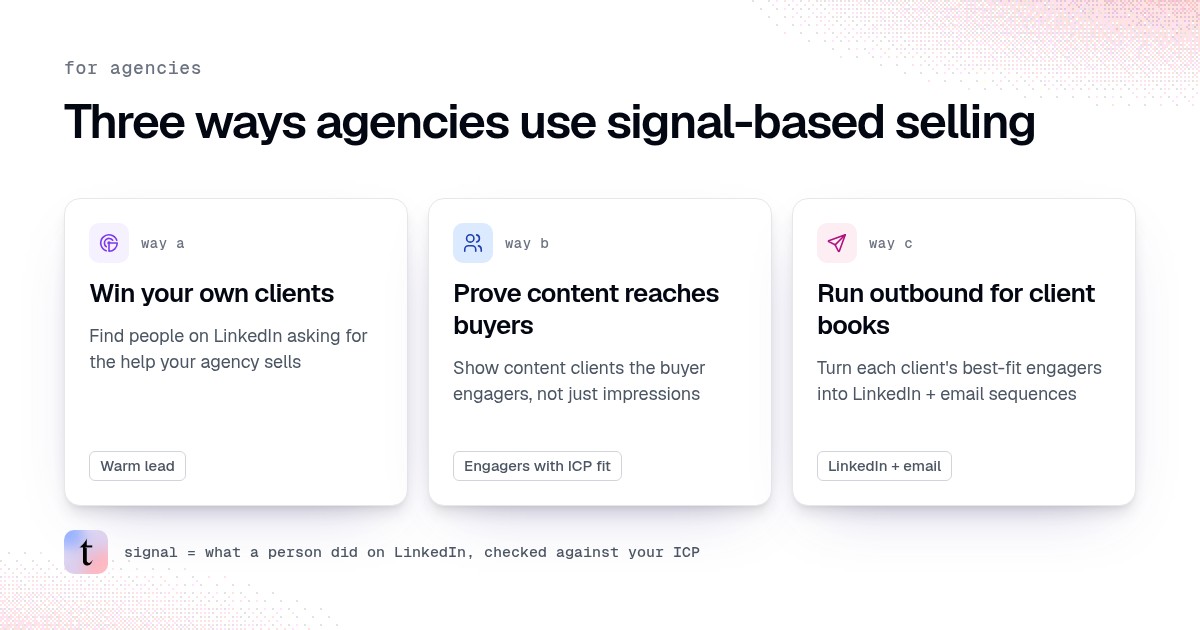
Agencies use signal-based selling in three ways. First, win your own clients by finding people who already ask for the service you sell on LinkedIn. Second, prove content results by showing which client posts brought in people who fit the client's ICP. Third, run outbound for client books from those same engagers, with the client owning follow-up or handing it to you under a clear scope. In traxy, each client (and your own agency book) gets its own workspace, lead criteria and signals. Discovery runs as signal-based outbound on autopilot. You still review fit and approve messages before anything sends. Agencies buy this self-serve for their own clients.
traxy runs your entire LinkedIn GTM end to end, from finding high intent leads from social intent to enriching and researching each one, to running relevant, personalized LinkedIn and email outreach to them on autopilot. For an agency, it does that once per client: each client gets its own workspace, its leads come from the client's own posts, profile viewers and the people engaging with competitors and creators, and outreach goes out from the client's own connected LinkedIn and email accounts. You test each client's campaign on sample leads and approve it once, then it runs on its own, or you approve every message before it sends.
Last checked: November 10, 2026.
What does signal-based selling mean for an agency?
Signal-based selling means you contact people because of something they did in public that relates to your offer, not because their title matched a list. For agencies, the useful signals are often LinkedIn posts and comments: a founder asking who can help with a service, a buyer engaging with a client's post, or a prospect commenting on a problem you solve.
traxy records that evidence next to each lead. Signal labels (Warm, Related, Activity, ICP match) describe strength. Lead criteria describe who fits. Keep those separate when you brief a client or write outreach (signals, lead criteria).
Why do agencies need a different setup than a single SaaS team?
An agency juggles audiences. Your own new-business motion is one ICP. Each retained client has another. Mixing them in one list contaminates reports and outreach.
traxy's agency playbook is simple: one service and buyer segment per campaign, a shared view for that audience, and separate workspaces for separate client or business contexts. Check which workspace is open before you change criteria or launch anything (agency outreach).
Agencies that want this for their own clients buy self-serve and create the workspaces they need. This guide does not assume a separate Partner product.
Way 1: How do you win your own agency clients from LinkedIn signals?
Your agency's new-business motion is the same job as any B2B seller, with one difference: buyers often post recommendation requests in plain language ("anyone know a good agency for this?").
Open a workspace for your agency's own acquisition, not a client retainer.
Set lead criteria for the buyer who hires you (founder, head of marketing, RevOps lead, and so on).
Set signals around the problems and asks that precede a hire.
Search LinkedIn likes, posts and comments in plain English, or follow creators and competitor founders your buyers listen to (social intent search, tracking).
Review ICP match and the source post or comment. Qualify at 50 percent ICP match or higher (qualification).
Save a shared view, prepare a campaign, and approve send from your own LinkedIn and email accounts (review and launch).
Reply to what they asked. Do not invent budget, timeline or a desire to buy from you (signal cheat sheet).
The full worked path for agencies hunting their own clients is in how agencies find new clients with social intent search. Use that when the goal is new logos for the agency itself.
If your agency sells Shopify or ecommerce growth work, how Shopify and ecommerce agencies find brands to pitch on LinkedIn applies these steps to brand founders and ecommerce leads, with research for replatforms, new product lines and retail expansion.
Way 2: How do you prove content results with engagement signals?
Content and ghostwriting retainers die on impression charts. A founder wants named people who could buy, tied to specific posts.
That is the second agency use of signal-based selling: turn client post engagement into a lead report the sales team can read.
In the client's workspace:
Write the client's lead criteria and signals so peers and job seekers drop out.
Follow the client's founder and executives as LinkedIn profiles (relationship tags such as Influencer or Custom, as you prefer). Built-in tags are Competitor, Teammate, Influencer, Investor and Custom (tracking).
Each month, filter Warm and Related leads, save a view, check Insights, and export the people, noting the posts that brought them in.
That report answers "did buyers notice?" without promising closed revenue you cannot control. The setup, report sections and prompts live in how LinkedIn content agencies use traxy. The retention angle is covered in how a LinkedIn content agency proves ROI.
Slack is the live version of the same idea. Connect Slack in the client workspace, save the view the client should see, and route new qualified leads to their channel. Name one owner on the client side. Full steps: client Slack lead alerts from LinkedIn.
Do not duplicate that setup here. The point for signal-based selling is the framing: the signal is the engager and the post, not the impression count.
Way 3: How do you run outbound for client books from the same signals?
Some clients want more than a list. They want outreach to the engagers who fit.
Agree the handoff before the first sequence:
Model | Who writes and approves | Who owns the LinkedIn and mailbox | What the agency delivers |
|---|---|---|---|
Report only | Client | Client | Monthly people + posts |
Alerts | Client | Client | Slack (or similar) as leads arrive |
Agency-run outbound | Agency, with client brand rules | Client's connected accounts, or accounts the client provides | Sequences the client reviewed |
Client-run outbound | Client | Client | Qualified views and evidence only |
In traxy, campaigns send from connected sender accounts after you test and approve launch. Check that the research supports every personalization fact. You (or the client) use the recorded signal and skip weak evidence (outbound from qualified signals, sequences).
Keep client outbound in that client's workspace. Never enroll the same person in two active sequences. Enrich email only for people you will actually contact (contact details). Email lookup is included with eligible plan access. Phone lookup requires the phone add-on or an entitlement that includes it.
How do outbound agencies find leads for their clients?
Outbound agencies find leads for their clients by looking for people showing interest on LinkedIn and checking each one against that client's ICP. In traxy, each client's workspace finds them from the client's own posts and profile viewers, from people engaging with competitors' and creators' posts, from single posts by URL and from Social Intent Search, and only people with a 50%+ match to that client's ICP become leads, each with the post or comment behind it.
The sources, all set up inside the client's workspace:
The client's own posts. In Targeting > People, track the client's founder and executives. traxy checks whoever likes or comments on their posts against the client's ICP (Tracking). This is the same setup as the lead report in way 2.
Profile viewers. Switch on Profile views under Targeting > Signals > LinkedIn activity to turn profile views into leads too. In Leads > Filters > LinkedIn activity, pick "Viewed any profile" for any time or the last 7, 30 or 90 days.
Competitors' and creators' engagers. Track the competitors and creators the client's buyers follow, tagged Competitor or Influencer, plus company pages by domain. traxy qualifies the people who engage with their posts.
One post. Paste any LinkedIn post URL into Targeting > Posts > Track post, or into trax, and get the engagers who fit the client's ICP.
Social Intent Search. Describe the person and the need in plain English ("find me founders looking for AEO help") and search 71M+ scanned LinkedIn likes, posts and comments, with the post or comment behind each person (Social Intent Search). It works in the app, through trax, or from Claude or ChatGPT through the traxy MCP.
Signals outside LinkedIn, such as hiring, funding or a job change, come from research on each lead inside a campaign, not from a live event feed.
Agencies already run this loop. traxy co-founder Ben Buaron has set traxy up for 35 of his agency's clients, with ICP-fit engagers routed to Slack channels shared with each client's sales team. Forj Media, a LinkedIn content agency, adds traxy engager reports to client reporting for roughly two-thirds of its clients, and founder Matt Huang estimates it extends client retention by at least a couple of months.
How each client's workspace keeps its own ICP, Tracking, leads, campaigns, senders and Slack routes is in how per-client workspaces work in traxy. The agency workflow from tracking to outreach is on traxy for agencies.
How do I run LinkedIn outbound for my agency's clients from their own accounts?
In traxy, set each client up in their own workspace and connect the client's LinkedIn and email accounts as senders there, so outreach goes out from their own accounts. Each campaign in that workspace researches every lead, groups leads by signal and prepares personalized LinkedIn and email sequences; you test it on sample leads and approve it once, then it runs on autopilot, or you approve every message in a review queue.
Create the client's workspace from the workspace menu, and check which workspace is open before you change anything (agency outreach).
Enter the client's website. traxy drafts the ICP and the signals to watch, and you review them with the client.
Connect the client's LinkedIn account and mailbox under Settings > Sender accounts. Sign-in happens in the connection flow. Each sender keeps its own limits, active hours and ramp-up, and a campaign does not bypass them. A sequence with LinkedIn and email steps needs a sender name with both channels connected (sender accounts).
Save a shared view of the client's qualified leads and create a campaign on it with the offer and the research you need (create a campaign).
Test the campaign on sample leads. Nothing is sent. Check the research and drafts against the client's brand rules.
Review the launch: who joins, who is skipped because another campaign holds them or they were contacted before, the sender, the steps and the delivery mode. Approve every message in a review queue, or let the approved campaign send on its own (review and launch).
Replies, unsubscribes and hard bounces stop the sequence. Replies come back to the inbox in the client's workspace, one conversation per lead across LinkedIn and email (inbox).
You can run the same steps from Claude, ChatGPT, Codex, Cursor or Grok through the traxy MCP: draft, test and launch the client's campaign, manage sequences and senders, and answer replies. Name the client's workspace in each prompt; the AI asks for your yes before anything sends or launches.
Windmill Growth, the LinkedIn content agency traxy co-founder Ben Buaron built, added outbound for an existing content client, set it up once in traxy and closed a 9k upsell.
Picking a tool for many client accounts, and where sending-first tools fit better, is covered in best LinkedIn automation tools for agencies managing multiple clients. More on the outreach side in LinkedIn outbound with traxy.
Can one LinkedIn engagement tool find clients for your agency and run lead gen for your clients?
Yes. In traxy, your agency gets its own workspace for winning new clients and each client gets a separate workspace, so the same tool finds high intent leads from LinkedIn engagement and runs LinkedIn and email outreach for your own book and for every client. Other tools split the job differently: some find engagers but leave the sending to another tool, and some send but leave finding and scoring the leads to you.
traxy is the vendor writing this, so here are the criteria. A tool that covers both jobs captures the people who like and comment on posts, including competitors' posts, scores them against each ICP, looks up an email, sends over LinkedIn and email, keeps your agency's own workspace apart from client workspaces, and states what you may sell to clients. Competitor cells come only from each vendor's own pages, linked below.
What you need | Embers | Expandi | HeyReach | Teamfluence | Honeytrail | traxy |
|---|---|---|---|---|---|---|
Likers and commenters captured | People matching your ICP who engage with posts by profiles you monitor | Post engagement signal imports likers, commenters or both from a post | Imports the people who reacted to a post by URL; the import does not include commenters | Likes, comments, shares, follows and new connections around your team | Lists "Liked competitor post" as a signal; how it captures engagement is not documented | People who like or comment on posts by tracked people, company pages and single post URLs, plus Social Intent Search over 71M+ scanned LinkedIn likes, posts and comments |
Competitor posts | Yes: add competitors, influencers or teammates as monitored profiles | Any post, "yours or anyone's" | Any post URL (its help article suggests influencer posts) | Tracks competitor posts | Competitor engagement is a listed signal | Yes: track competitors and creators (Competitor or Influencer tag) and company pages by domain |
ICP scoring | Ranks people by ICP fit and shows why each one surfaced | ICP Filter step on title, industry and company size; no score documented | Not documented for the software | Scores each incoming signal against your persona and company rules | Each lead is "checked against your criteria" | Only people with a 50%+ ICP match become leads, labeled Warm, Related or Activity, with the post or comment behind each |
Email lookup | On paid plans, a missing email is looked up first when leads go to Instantly or Smartlead | Not documented on the pages checked | Finds verified emails with enrichment credits | Enriches leads with email and phone | Every lead comes with name, company, email and role | Work email lookup; phone lookup with the phone add-on or an entitlement that includes it |
Sends LinkedIn and email | No. Embers pushes leads to Instantly, Smartlead or Emelia, and that tool sends | Yes: connection requests, messages and email follow-ups in one sequence | LinkedIn natively; email through Instantly, Smartlead or EmailBison | Connection requests through workflows; sending messages or email is not documented on the pages checked | Yes: a LinkedIn connection request and a follow-up email in one sequence | Yes, from your or the client's own connected LinkedIn and email accounts, after you test on sample leads and approve the launch |
Own agency workspace plus client workspaces | Agency plan: one workspace per client, and you can attach a workspace you already own; the Embers team sets it up | A central workspace with unlimited teammates and clients, roles and permissions; a separate own-agency workspace is not documented | A separate workspace for every client under one login; a separate own-agency workspace is not documented | "Your own agency workspace" plus one workspace per client; each workspace needs its own subscription, and the Teamfluence team turns agency features on | Outreach for "your agency and your clients' pipelines from separate workspaces" | A workspace for your agency's own new business plus one per client, each with its own ICP, Tracking, leads, campaigns and senders |
Resale terms | Terms bar reselling, sublicensing or redistributing the service without prior written consent; agency client reports can carry your brand | White labeling under your own branding; white-label setups go through sales | White label with your own domain and branding on its Agency and Unlimited plans | Certified Partner Program for agencies that sell and implement Teamfluence for clients, paid by commission | Not documented | Resell traxy's DFY Outbound, run by the traxy team, at a wholesale rate under your agency's brand, or run the service yourself on traxy (traxy for agencies) |
Sources, checked November 2026: Embers (home, for agencies, pricing and limits, terms); Expandi (home, pricing, Signals guide); HeyReach (for agencies, pricing, post reactor import); Teamfluence (home, how agency workspaces work, Certified Partner Program); Honeytrail (home). "Not documented" means we could not find it on those pages, not that the product lacks it.
Where each one fits better than traxy:
Embers fits better if you want a ranked lead queue and branded client reports, and you, or the client's own sending tool, do all the sending. Ask Embers for written consent before you resell access.
Expandi fits better if your service is mainly LinkedIn and email sequences, you want white labeling, and you are happy to filter post engagers by title, industry and company size yourself.
HeyReach fits better if you run many LinkedIn sender accounts for clients under one login, want the tool fully rebranded as your own, and already source leads elsewhere.
Teamfluence fits better if you want signals from your whole team's LinkedIn activity, enrichment and workflows, and a partner program for selling and implementing it for clients.
Honeytrail fits better if you are a digital marketing agency that wants a tool built around finding warm leads for agencies, with a LinkedIn and email sequence included.
traxy fits when one tool should do both jobs end to end. traxy runs your entire LinkedIn GTM end to end, from finding high intent leads from social intent to enriching and researching each one, to running relevant, personalized LinkedIn and email outreach to them on autopilot, in your agency's workspace and in each client's. Autopilot starts after your approval: you test each campaign on sample leads and approve the launch once, then it runs on its own, or you approve every message before it sends. Replies, unsubscribes and hard bounces stop the sequence. How the outreach works is on LinkedIn outbound with traxy, and the agency setup and DFY Outbound resale are on traxy for agencies.
The agency's own book works the same way. One LinkedIn account sent 439 connection requests for an agency offer to traxy leads and booked 11 calls in about 4 weeks, as traxy's Adam posted.
How should an agency pick which of the three to sell?
Start with way 2 (report), add Slack once the client trusts the names, and treat outbound as a separate line item. Way 1 runs in parallel on the agency's own workspace so referrals are not the only new-business source.
Goal | Start with | Link |
|---|---|---|
New agency clients | Social intent search + your own workspace | |
Content retainer proof | Client workspace, tracking, monthly report | |
Faster client follow-up | Slack route from a saved view | |
Outbound for a client book | Campaigns on a qualified view, approved send |
If you sell all three, price and staff them as different scopes. Mixing "we will get you meetings" into a content-only retainer is how expectations break.
What stays the same across all three ways?
One workspace per client or business context
Lead criteria before volume
Signals that match the offer
Human review of fit and of message facts
No claim that a like equals intent to purchase
Discovery runs automatically while outreach stays approved by you
That is signal-based selling for agencies without turning every engager into spam.
FAQ
What is signal-based selling for agencies?
Using public LinkedIn activity (asks, comments, reactions on relevant posts) to find prospects for the agency itself or for a client, then acting with the evidence in view.
Can one traxy workspace cover every client?
No. Keep separate client or business contexts in separate workspaces and verify the workspace before changes (agency outreach).
Do agencies need a Partner plan?
Agencies buy self-serve for their own clients and create the workspaces they need. This article does not describe a separate Partner product.
Does traxy write and send client messages on its own?
You prepare sequences from lead evidence, review them, and approve launch. Sends go through connected accounts. AI does not silently ship messages.
Should content agencies promise revenue from engagers?
Show qualified people and posts. Revenue depends on the client's sales follow-up. That distinction is why the report and Slack paths matter before outbound.
How do lead gen agencies run LinkedIn outreach for multiple clients?
In traxy, each client gets its own workspace with its own ICP, tracked profiles, leads, campaigns and connected sender accounts, so each client's outreach goes out from that client's own LinkedIn and email accounts. You test each campaign on sample leads and approve it once, then it runs, or you approve every message. The steps are in running outbound from a client's own accounts.
Can traxy send from a client's own LinkedIn and email accounts?
Yes. Connect the client's LinkedIn account and mailbox as senders under Settings > Sender accounts in the client's workspace. Campaigns in that workspace send from them, within each sender's limits, active hours and ramp-up.
Which LinkedIn engagement tools work for both my agency and my clients?
traxy gives your agency its own workspace plus one per client, finds high intent leads from LinkedIn engagement in each, and sends LinkedIn and email outreach after you approve the launch. Teamfluence, Honeytrail, Embers, Expandi and HeyReach also support work for clients, but they differ on finding engagers, ICP scoring, sending and resale terms. See the comparison table.
Related reading
Running signal-based selling for your own book or your clients? traxy is the LinkedIn GTM tool that finds the high intent leads in each workspace and keeps outreach approved by you. Set up your agency workspace in traxy.
Keep reading
All LinkedIn for Agencies guides
LinkedIn for Agencies: The Complete Guide (2026)
LinkedIn for agencies: how to run multi-client lead generation, content operations, automation, and signal-based prospecting at scale in 2026.
How Shopify and ecommerce agencies find brands to pitch on LinkedIn
How Shopify and ecommerce agencies find brand founders on LinkedIn, check for replatforms, new product lines or retail moves, and run approved outreach.
Someone liked your client's case study post. Now what?
A like alone rarely means intent. Reach out when the person fits the ICP and the post is close to a buying decision, and mention the topic, not the like.