
[ traxy for founders ]
Find high intent leads on LinkedIn.
Then reach them, from your own accounts.
For founders doing sales themselves. traxy runs your entire LinkedIn GTM end to end, from finding high intent leads from social intent to enriching and researching each one, to running relevant, personalized LinkedIn and email outreach to them on autopilot once you approve the campaign.
What is the best LinkedIn lead tool for a founder doing sales yourself, and what does it do for you each week?
If your buyers are on LinkedIn, the best tool for a founder is one that finds the people already talking about the problem you solve and then runs the outreach to them, and traxy does both: it finds high intent leads with a 50%+ ICP match, researches each one and sends personalized LinkedIn and email sequences from your own accounts after you approve the campaign. Each week it brings in new leads with the post or comment behind each one, and you spend your time on the replies and the calls.
Most founders selling on their own have the same problem: no time to build lists, no one to research prospects, and no idea who is actually looking for a solution this week. A title filter tells you someone could buy. A comment asking for help tells you they are thinking about it now. traxy starts from the second kind of signal and carries it all the way to a sent message, with you approving the campaign before anything goes out.
This page walks through how that works step by step, what a normal week looks like, what founders using traxy have reported, and where traxy is not the right fit. For the wider playbook, read how SaaS founders do outbound without an SDR team, and to compare tools by stage, see the best prospecting tools for founder-led sales.
[ Who it's for ]
Which founders is traxy built for?
Founders at B2B companies of any size who sell themselves, before they have a sales team or instead of building one yet, and whose buyers post, comment and like on LinkedIn.
- Founders running sales on their own. You are the person who finds prospects, writes to them and takes the call, between product, hiring and everything else.
- Founders who post on LinkedIn. The people engaging with your posts are often your best leads, and most of them never get a message. traxy turns that engagement into qualified leads.
- Founders in a niche market. When your buyers are a few thousand people in one industry, reaching the ones who just showed interest matters more than a bigger list.
- Founders who want control. You decide the ICP, the offer and the message, and you approve the campaign, or every single message, before anything sends.
Sales teams have their own page: traxy for sales teams. Every other workflow is listed in traxy use cases.
[ Step 1: find the leads ]
How does traxy find high intent leads for a founder?
traxy looks for social intent on LinkedIn: what people post, comment and like, who views your profile, and who engages with the competitors and creators you track. Only people with a 50%+ match to your ICP become leads, and each one shows the post, comment or like that put them on your list.
- Give traxy your website. It drafts your ideal customer (roles, seniority, locations, company size, industry and exclusions) and the signals to watch: buyer pains, product mentions, triggers and keywords. You fix anything that's off, then review a lead preview.
- Search the social intent database. With Social Intent Search, describe the person and the need in plain English, such as "founders in the US looking for help with LinkedIn outbound", and search 71M+ scanned LinkedIn likes, posts and comments. Each person comes with the post or comment behind them.
- Track the people and pages around your market. Use Tracking to follow people (competitors, influencers, investors, your co-founder), single posts by URL and company pages by domain, and traxy qualifies whoever engages. There are no tracking limits on profiles, posts or company pages.
- Track yourself. Add your own LinkedIn profile, and the people engaging with your posts become qualified leads.
- Turn profile views into leads. traxy picks up the profile views of the sender accounts you connect. Filter leads by who viewed your profile in the last 7, 30 or 90 days.
- Read the reason on every lead. Each lead is labeled Warm, Related or Activity by how strong the evidence is, and the Signals tab shows the source and its date. Mark a lead Good fit or Bad fit with a reason, and add existing customers to the blocklist so they stay out.
A post or comment is a reason to reach out, not proof that someone will buy. The ICP match score measures fit, not the chance of a purchase.
[ Step 2: run the outreach ]
How does traxy research each lead and run the LinkedIn and email outreach?
A traxy campaign researches each lead for the facts you ask for, groups the leads by signal and prepares a personalized LinkedIn and email sequence for each group, sent from your own connected accounts. You test it on sample leads with nothing sent, approve the campaign once and then it runs on autopilot, or you approve every message.
- Enrich the leads. traxy looks up a verified work email and a phone number for a lead, and Auto-Enrich can do it for every newly qualified lead.
- Create a campaign. In Outbound > Campaigns, or by asking trax, give the audience (a saved shared lead view, for example "Warm leads who engaged with a competitor"), your offer and the research you need, such as what the company sells or whether it is hiring for a role.
- Research on each lead. The campaign researches every lead before any message is prepared. It filters out who doesn't fit, groups the rest by signal and gives each group its own message variant, personalized with the evidence. When a required fact isn't found, the lead stays in traxy and you can choose to skip it in the campaign.
- Test on sample leads. The test runs the plan on a few leads so you can read the research and the drafts. Nothing is sent. Change the brief or the copy until the drafts sound like you.
- Review the launch. Before launch you see who joins, who is skipped (already in another campaign or contacted before), the sender, the steps and the delivery mode.
- Approve once, or approve every message. Approve the launch and the campaign sends on its own from your connected LinkedIn account and mailbox, within the limits, active hours and ramp-up you set. Or choose approval mode and approve each message in a review queue.
- Answer the replies. Replies, unsubscribes and hard bounces stop the sequence. Every LinkedIn and email conversation lands in one inbox, where you reply or pause a lead's sequence to take over.
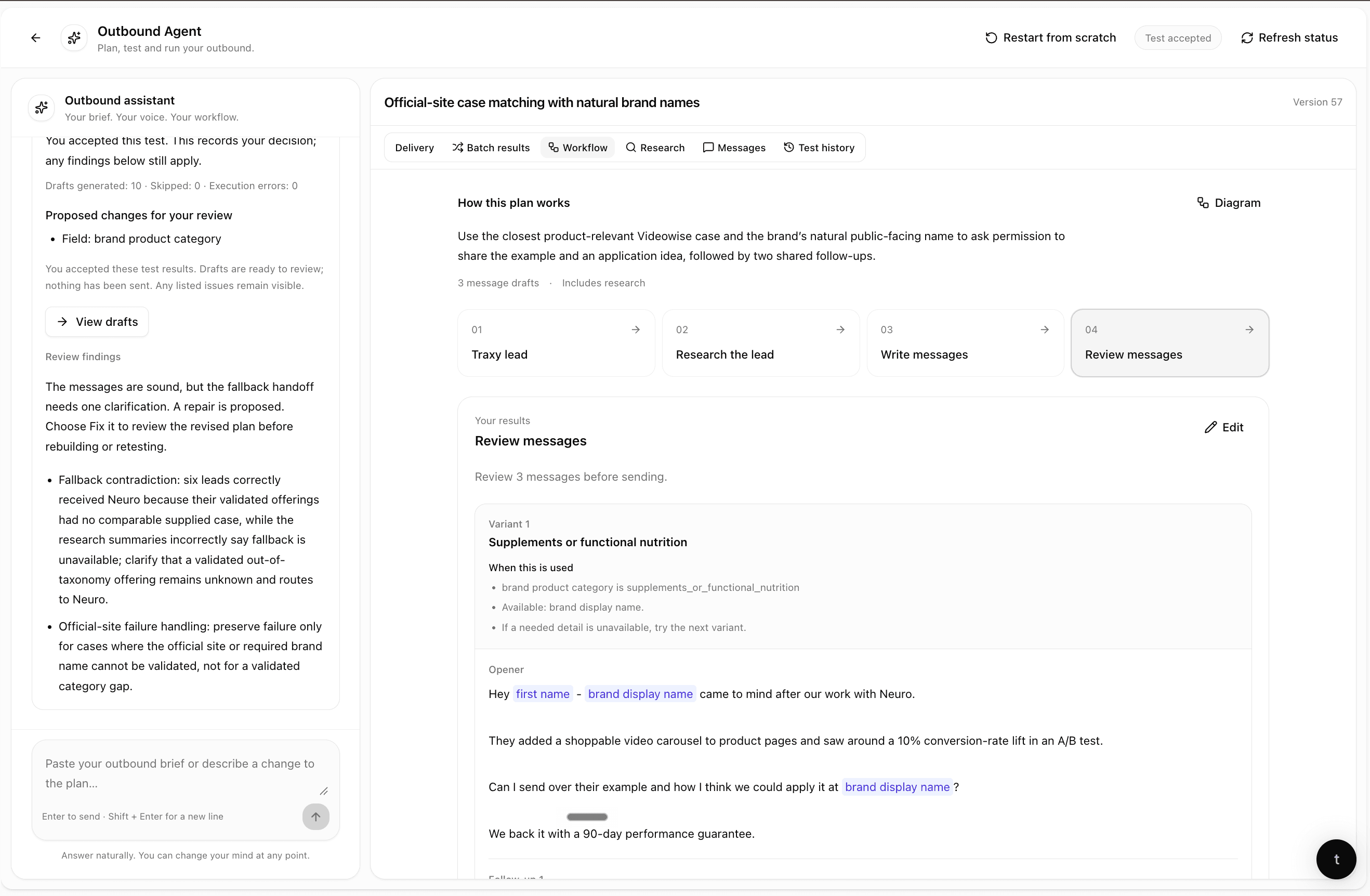
You can run several campaigns at once on different signals, for example one for people engaging with your own posts and one for a competitor's engagers. Campaigns run in priority order, so one lead never gets two campaigns at the same time. More on the sending half: LinkedIn outbound with traxy.
[ Where you run it ]
Can I run traxy from Claude, ChatGPT or another AI chat?
Yes. You can run traxy by hand in the app, through trax (the traxy agent inside the app), or from Claude, ChatGPT, Codex, Cursor or Grok through the traxy MCP, with a yes in chat before anything sends.
- trax, in the app. One chat to find new leads, search the leads you already have, change your ICP and signals, research leads and build campaigns. Anything that changes your setup shows an approval card first, and trax can remember context for you.
- The traxy MCP, in your AI chat. Connect traxy once with a sign-in. From the chat you can search social intent, list and research your leads, start a discovery run, update your ICP and tracked profiles, and run campaigns: draft, test on sample leads, launch, manage sequences and senders, send a one-off message and reply in the inbox. The AI shows what it will do and asks for your yes before anything sends or launches.
Example prompts: "find founders in NYC showing social intent for LinkedIn outbound", "show me this week's Warm leads and the posts behind them", "test my competitor-engagers campaign on five sample leads". Setup and the full list of actions: the traxy LinkedIn MCP.
[ A founder week ]
What does a founder week with traxy look like?
Once your ICP, signals and first campaign are set, a week is mostly reading new leads, answering replies and changing one thing in a campaign. The finding, research and approved sending keep running in between.
- Once, at the start. Set up from your website, fix the ICP and signals, track your own profile and two or three competitors or creators, connect your LinkedIn account and mailbox as senders, then build, test and approve your first campaign.
- Monday: check the new leads. Open the Warm leads, read the reason behind each one, and mark bad fits so the list stays clean. A daily brief in traxy or Slack can summarize what came in.
- Every day: answer replies. Reply in the one inbox, book the calls, and pause a sequence when you want to take a conversation over. In approval mode, clear the review queue too.
- When a post of yours or a competitor's takes off: paste its URL into traxy or trax and get the engagers who fit your ICP, then add them to a campaign through a shared lead view.
- End of the week: adjust. See which campaigns are getting replies, then change one thing: the signal, the audience, the research or the message. Retest on sample leads before the change goes live.
Time spent depends on how many replies you get and whether you approve every message. traxy doesn't take the sales calls for you.
[ Proof ]
Which founders use traxy, and what happened?
These results come from traxy's published case studies, figures and quotes as published. They are those teams' results, not a promise of yours.
- Vamo. Vamo's founder was getting heavy LinkedIn engagement from the recruiters and hiring teams they sell to, and nobody could keep up with it. With traxy, Vamo went back through 64 posts they'd already published and turned that engagement into 14 replies and 11 booked meetings without writing a new post. First lead: 4 minutes. Vamo case study.
- Superfiliate. Co-founder and CEO Andy Cloyd still writes every LinkedIn message himself. traxy surfaces the people engaging with his posts, the market's and competitors', scored against his ICP, and Superfiliate books 10 to 20 qualified meetings a month from traxy signals. Superfiliate case study.
- Paper Run. Paper Run swapped Sales Navigator title filters for people engaging with content in their industry and went from 3 to 5 meetings every 60 days to 16. Paper Run case study.
- Nostra. A founder-led, referral-driven team. Founder Arthur Root: "traxy is perfect for people with a large network, but not a lot of time." Their first intro came about 30 minutes after onboarding. Nostra case study.
- Outcome Catalyst. Founder Zach Shapiro was manually checking likes and comments on his posts. Before traxy: "Take every meeting." After traxy: "Only spend time with people already showing intent." Outcome Catalyst case study.
The same way of finding leads, outside founder-led teams: Platter, a Shopify agency, sources leads from the voices and competitors it follows in traxy Tracking, and its reply rate went from about 20% to 41% (Platter case study). All results: case studies.
[ Where traxy doesn't fit ]
When is traxy not the right tool for a founder?
traxy is built for B2B founders whose buyers are active on LinkedIn. It is the wrong pick in these cases:
- You sell to consumers. traxy is for B2B.
- Your buyers rarely use LinkedIn. traxy finds leads from LinkedIn activity. If your buyers talk on Reddit, X or Hacker News instead, a keyword tool for those sites fits better.
- You want messages to go out with no review. Every traxy campaign waits for your approval of the launch, and you can approve every message on top of that.
- You already have a clean list and only need sending. A LinkedIn sending tool or a cold email tool can be simpler.
- You sell to a few dozen named accounts and want every touch by hand. LinkedIn Sales Navigator alone can be enough.
- You want someone else to run it. An agency fits better than a tool you run yourself.
A side-by-side of these tools for founders, from each vendor's own pages: best prospecting tools for founder-led sales.
[ Start ]
How do I get started with traxy as a founder?
Enter your website, check the ICP and signals traxy drafts, and review the lead preview. Then connect your LinkedIn account and mailbox, build one campaign on your strongest signal, test it on sample leads and approve the launch. Plans and what each includes are on traxy pricing.
[ A few answers ]
FAQ
What is the best LinkedIn lead tool for a founder doing sales themselves?
For a founder whose buyers are active on LinkedIn, the best tool finds the people who are already posting, commenting and liking around the problem you solve and then runs the outreach to them, so you are not stitching three tools together. traxy does both: it finds high intent leads from LinkedIn social intent, keeps only people with a 50%+ ICP match, researches each one and runs personalized LinkedIn and email outreach from your own connected accounts after you approve the campaign, or you approve every message.
What does traxy do for a founder each week?
It brings in new high intent leads from the signals you set, each with the post or comment behind it, researches them inside your campaigns and sends the LinkedIn and email steps from your own accounts. You read the new leads, answer replies in one inbox and adjust a campaign when something isn't working. A daily brief in traxy or Slack can summarize what came in.
Does traxy replace hiring a salesperson?
No. traxy does the prep work around outreach: finding the leads, checking fit, looking up contact details, researching each lead and sending the sequences you approved. You still own the ICP, the offer, the approval, the replies and the sales calls. When you do hire, teammates can work in the same workspace with lead owners, tags and notes so teammates don't double up, and the launch review skips leads already in another campaign or contacted before.
Do I have to approve every message?
You choose at launch. Either you approve the campaign once after testing it on sample leads, and then it runs on its own, or you pick approval mode and approve every message in a review queue. Nothing sends before you approve the launch, and replies, unsubscribes and hard bounces stop the sequence.
Will the messages come from my own LinkedIn and email accounts?
Yes. traxy sends from the LinkedIn accounts and mailboxes you connect as sender accounts, with daily limits, active hours, ramp-up and email signatures you set. Sending needs a connected sender account.
Can I still write my messages myself?
Yes. traxy prepares drafts from the research on each lead, and you can edit them before launch. You can also send a single LinkedIn message, connection request or email to one lead, or use traxy only to find and qualify leads and write every message yourself, as Superfiliate's CEO does.
Can I run traxy from Claude or ChatGPT?
Yes. Connect the traxy MCP to Claude, ChatGPT, Codex, Cursor or Grok. From the chat you can search social intent, research leads and draft, test and launch campaigns, manage sequences and senders, and answer replies. The AI shows what it will do and waits for your yes before anything sends or launches.
Is LinkedIn outreach with traxy safe for my account?
traxy sends within the daily limits, active hours and ramp-up you set on each sender account, and it stops a sequence when someone replies, unsubscribes or bounces. No tool can promise zero risk of LinkedIn restrictions, so keep volumes modest and send to people with a real reason to talk.
Which founders is traxy not a fit for?
B2C founders, founders whose buyers rarely use LinkedIn, and founders who want messages to go out with no review at all. If you already have a clean list and only need a sending tool, or you sell to a few dozen named accounts and want to do every touch by hand, a simpler tool can fit better.
How much does traxy cost?
Plans are on the traxy pricing page at traxy.ai/pricing.
[ traxy for founders ]