
See who engages with LinkedIn posts by title, industry and company size (traxy audience data inside Ordinal)
See who engages with your LinkedIn posts by title, industry, company size and location in Ordinal, using traxy aggregate audience data, not named contacts.
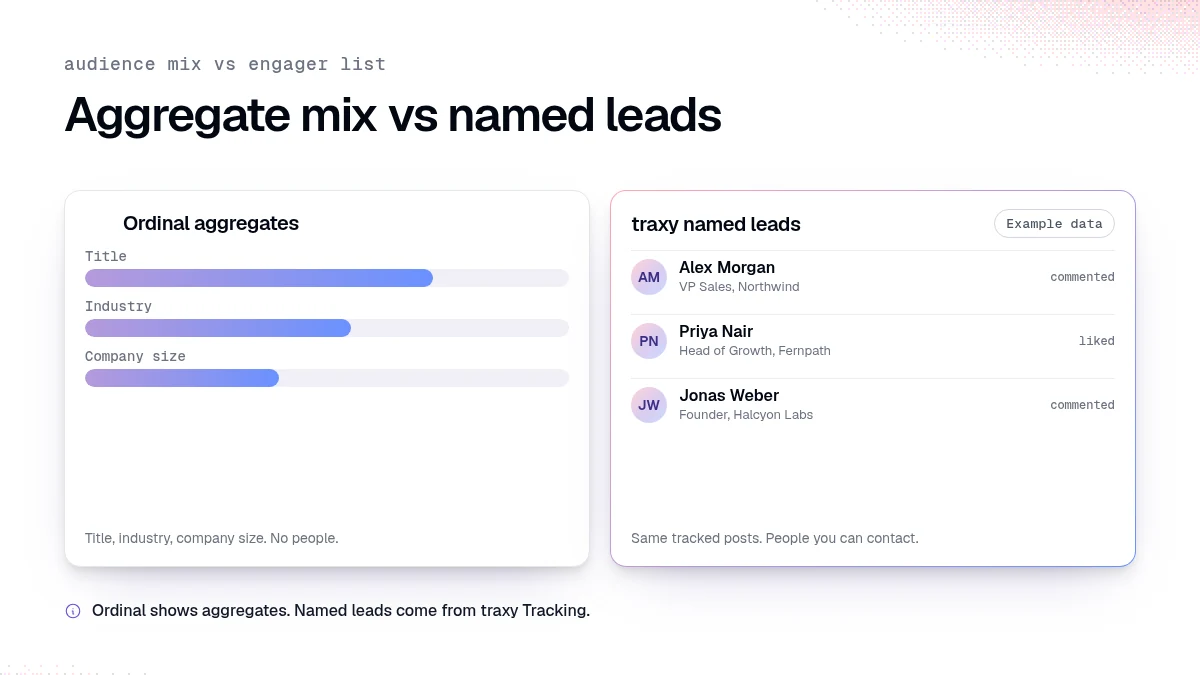
LinkedIn's native analytics show counts. Clients ask whether the right titles and industries showed up. The Ordinal integration reads aggregate audience breakdowns from traxy for LinkedIn posts you track: industry, title, company size, and location. It does not return individual people, emails, or profile URLs. When you need named leads from those same posts, use traxy Tracking and Leads. Agencies often run both: Ordinal for the audience story, traxy for the engager list that sales can contact.
Last checked: November 5, 2026.
Why aggregate audience mix matters for LinkedIn content agencies
Impression charts do not answer the month-three question: "Are buyers in the room?"
Clients want to know:
Are engagers in the target titles?
Are they in the industries we sell to?
Are company sizes realistic for the offer?
That is an aggregate reporting job. It is different from exporting a list of people to message. Confusing the two creates compliance and expectation problems.
Agency ROI context: prove ROI and churn and client lead report.
What the Ordinal integration can read
Per Ordinal docs, Ordinal can use:
Workspace audience breakdowns by industry, title, company size, or location
Aggregate audience analytics for LinkedIn posts tracked in your workspace
Post-level engagement counts and sync counts
Audience discovery status for a LinkedIn post
Ordinal responses are aggregate-only. They do not include individual people, emails, phone numbers, LinkedIn profile URLs, raw comments, or raw scraped data.
How to connect Ordinal
High level from the docs:
In traxy, open Integrations > Ordinal (owners/admins)
Generate a dedicated Ordinal API key (shown once)
In Ordinal, open the traxy integration and paste the key
Store the key in your secret manager
You need access to the traxy workspace, a paid workspace with API access available, and an Ordinal account. Use the key only for Ordinal.
How to use aggregates in a client meeting
Suggested slide order:
Posts tracked this month
Aggregate title mix vs agreed ICP titles
Industry and company size mix
One example post that over-indexed on the right titles
Separate slide: named leads (from traxy Leads) the client sales team can contact, if the client approved that handoff
Do not paste Ordinal charts and imply they contain personal contact data. They do not.
Setup checklist for agencies
Confirm the client (or your agency workspace) tracks the LinkedIn posts that matter
Confirm an owner/admin can generate the Ordinal key in traxy
Store the key in a secret manager; rotate if leaked
Connect the key inside Ordinal's traxy integration
Pull aggregate breakdowns for a single post before you promise a client dashboard
Agree in writing that Ordinal slides are aggregate, while named leads come from a separate export
If API access is missing on the workspace plan, stop and upgrade or skip Ordinal. Do not scrape LinkedIn to fake the same chart.
How this pairs with month-three retention conversations
A typical agency risk is the six-month churn cliff when clients only see impressions. Show:
Week-over-week mix of ICP titles on tracked posts
One post that pulled the wrong audience (and what you changed)
A short named-lead appendix sales actually used
Matt Huang's ROI article covers the retention framing (prove ROI). Ordinal helps the mix chart. traxy Leads helps the appendix.
What not to automate
Do not auto-post Ordinal aggregates into client Slack without a human caption
Do not merge aggregate bins into CRM as if they were contacts
Do not claim location or title precision beyond what the integration returns
Aggregate analytics support decisions. They are not a substitute for qualified people.
Named leads still come from Tracking
When the client wants people, not bars:
Track the LinkedIn posts in traxy
Review qualified engagers against lead criteria
Send alerts or exports through Slack or Zapier
Keep do-not-contact current
That workflow is covered in LinkedIn content agency client leads and client Slack lead alerts.
Ordinal vs LinkedIn creator analytics vs traxy Leads
Need | Best surface |
|---|---|
Native reach and reactions | LinkedIn creator / post analytics |
Aggregate title/industry mix from tracked posts | Ordinal + traxy audience analytics |
Named people to contact | traxy Leads / Tracking |
AI chat over workspace leads | traxy MCP in documented AI clients |
Reporting cadence that clients understand
Weekly: one aggregate chart for the posts that ran
Monthly: title mix vs ICP targets, plus three named lead examples sales touched
Quarterly: which content themes pulled the right industries
Keep the Ordinal chart and the named-lead table on separate slides so nobody asks for emails out of a bar chart.
Security note for agency operators
Use a dedicated Ordinal key, not a personal REST key meant for other integrations. If someone leaves the agency, rotate the Ordinal key and update Ordinal the same day. Never paste keys into client decks or chat threads.
FAQ
Can Ordinal show me who commented?
No. Aggregate only. Use traxy post Tracking for qualified commenters and likers.
Do I need Ordinal to use traxy?
No. Ordinal is optional for teams that already report in Ordinal or want that presentation layer.
Is audience discovery the same as lead discovery?
No. Audience discovery in the Ordinal docs is about aggregate audience analytics for a post. Lead discovery creates qualified people in traxy.
Next step
If you schedule client posts and need ICP mix charts, connect Ordinal with a dedicated key from traxy Integrations. Keep named outreach in traxy Leads so the aggregate story and the contact list stay honest.
Keep reading
All LinkedIn for Agencies guides
LinkedIn for Agencies: The Complete Guide (2026)
LinkedIn for agencies: how to run multi-client lead generation, content operations, automation, and signal-based prospecting at scale in 2026.
For LinkedIn ghostwriting agencies: turn a client's profile views into leads the client can follow up
For LinkedIn ghostwriting agencies: turn a client's profile views into a short list of fit leads the client can follow up, and report that instead of views.
How agencies find new clients from LinkedIn posts and comments with social intent search
How agencies find new clients on LinkedIn: search posts and comments for people asking for your service, check fit, and reply to what they asked.