
LinkedIn GTM strategy: a six-step plan to find, qualify and reach buyers on LinkedIn
A LinkedIn GTM strategy in six steps: define your buyer, choose signals, pick sources, qualify, run approved outreach and track meetings by source.
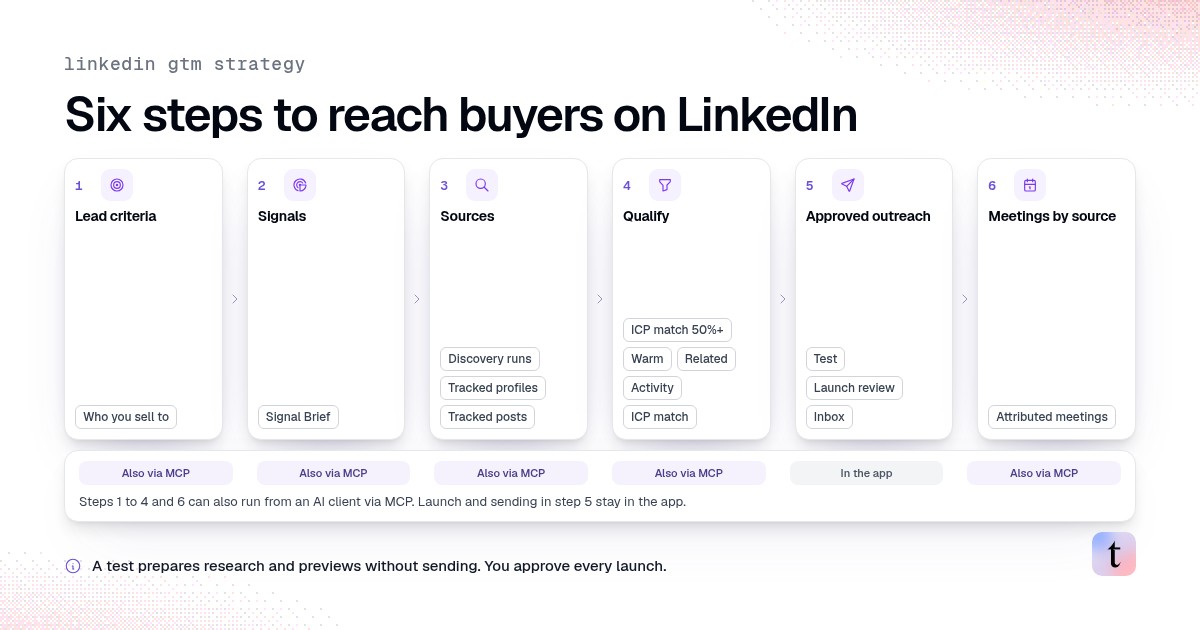
A LinkedIn GTM strategy is the plan for how your company finds buyers on LinkedIn, decides which of them fit, contacts them and measures what turned into meetings. It has six parts: define who you sell to, choose the signals that make someone relevant, pick the sources to watch, qualify each person, run outreach with a human approving it, and track meetings by source. Many teams spread these across several tools. traxy is the LinkedIn GTM tool built to run all six from one workspace, in the app or from an AI client like Claude or Codex.
Last checked: November 11, 2026, against traxy's documentation and public MCP tool catalog.
If you're comparing tools for this, see the best LinkedIn GTM tools. This article is about the plan itself.
How do you build a LinkedIn GTM strategy?
You build a LinkedIn GTM strategy by deciding who you sell to, which LinkedIn activity makes someone worth contacting now, and how you reach them. The right tool depends on which of those jobs you need covered. For both halves in one place, traxy finds high intent leads from LinkedIn activity at a 50%+ ICP match and runs LinkedIn and email outreach from your own connected accounts after you approve the campaign. If you only need to search for accounts and send InMail by hand, Sales Navigator fits better. Already happy with your sending tool? Route traxy leads into it.
Why LinkedIn needs its own GTM plan
LinkedIn is where B2B buyers post about their problems, comment on other people's posts and follow the voices in their field. That activity is public evidence of what someone cares about this month, which a static contact database doesn't capture. It also makes LinkedIn easy to misuse: reacting to every like as a buying sign, or messaging everyone in a search result.
A plan keeps three questions apart that teams often blur: does this person fit, what did they do, and what should we say given that evidence?
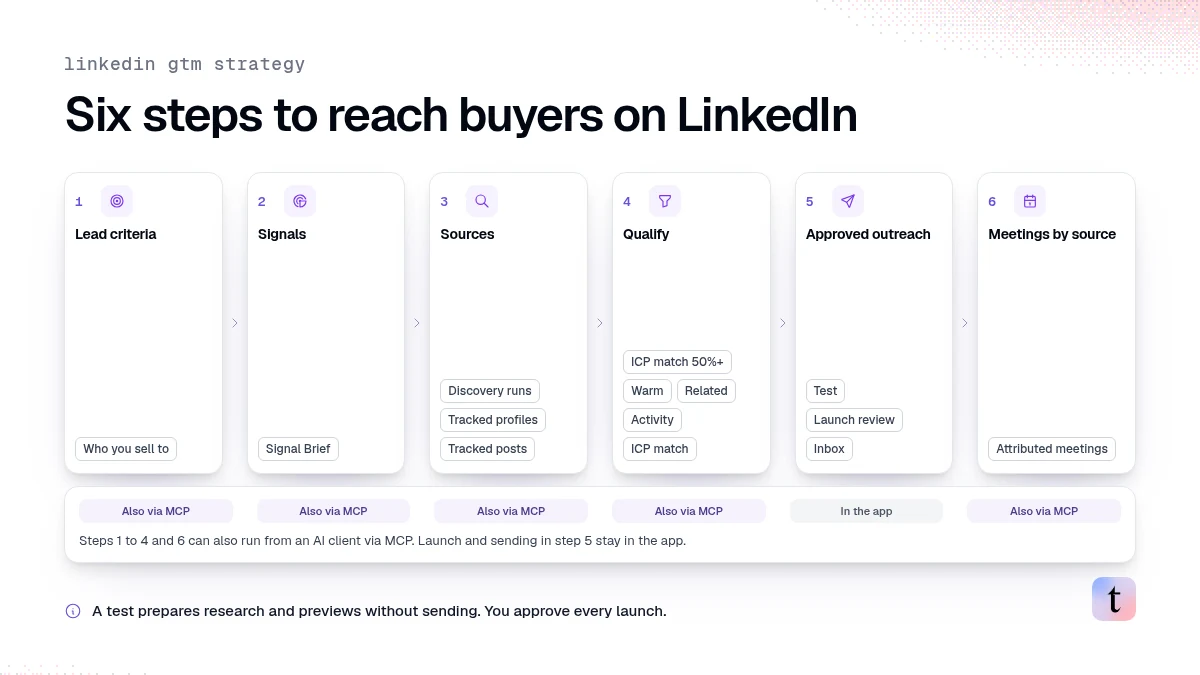
Step 1: Define who you sell to
Write down the people and the companies separately.
People: roles, departments, seniority, locations.
Companies: size, industry, revenue, funding, and keywords or niches that describe your market.
Start with what separates a buyer from a broad audience. "Sales leaders at software companies with 20 to 200 employees" beats a long list of loosely related titles.
In traxy this is Targeting > Lead criteria. Every person traxy finds is checked against these criteria, and only people with an ICP match of at least 50% become qualified leads (how qualification works). For a template, see ideal customer profile template.
Step 2: Choose the signals that matter
Signals describe the evidence that makes a fitting person worth contacting now. Write them as problems and situations your buyers would post or comment about, in their words:
"Rebuilding an outbound list after a bad quarter"
"Asking for recommendations for a LinkedIn tool"
"Hiring a first SDR"
In traxy, these live in Targeting > Signals as the Signal Brief. Each lead then carries a label that tells you how strong its evidence is: Warm (a direct signal relevant to your offer), Related (contextual evidence), Activity (a weaker connection) or ICP match (fit with no recorded signal of the other types) (signals docs).
Keep fit and signals separate. A relevant post doesn't make someone a lead if they don't meet your criteria.
Step 3: Pick where to look
traxy uses three discovery sources, and a working plan uses more than one:
Source | What it finds | Good for |
|---|---|---|
Discovery runs | People matching your lead criteria and signals | Steady lead flow |
Tracked profiles | People engaging with posts from profiles you choose | Competitors, influencers, your own team |
Tracked posts | People engaging with one specific post | A viral post, an event post, a competitor launch |
Tracked profiles take a relationship tag: Competitor, Teammate, Influencer, Investor or Custom. Ongoing monitoring follows the five most recent posts published after you add a profile (tracking docs).
For one-off questions, Social intent search finds posts and engagements about a topic in plain English. Keywords belong there, not in tracking.
Step 4: Qualify before anyone writes
Open Leads and review each person's role, company, ICP match and the signal behind them. Mark Good fit or Bad fit with a reason. Feedback records your judgment; it doesn't rewrite the score, so review proposed targeting changes separately.
Save the leads you want to work as a shared view, such as "Warm, ICP 70+, last 14 days." That view becomes the audience for campaigns and integrations. Our guide to what makes a lead warm covers the checks.
Step 5: Run outreach with a human on the launch
Signal-based outbound on autopilot still needs someone to approve what goes out. In traxy:
Connect sender accounts in Settings > Sender accounts. A LinkedIn and email sequence needs a sender name with both channels.
Create a campaign from your shared view in Outbound > Campaigns, or ask trax.
Run a test. A test prepares research and previews without sending.
Review the launch dialog: who joins, who's excluded, sender, steps and delivery mode.
Approve the launch. If the delivery mode requires it, approve messages in the review queue too.
Replies land in Inbox, with one conversation per lead. A reply stops the active sequence for that person. For message angles, see from a LinkedIn signal to a message you can back up.
If your team sends from another tool, route the view there instead through Slack, a webhook, Zapier, n8n or Clay (routes).
Step 6: Measure meetings by source
Engagement volume is not a sales outcome. Connect Google Calendar so traxy can match meetings to leads, then record outcomes such as Active opportunity, Already a client or Closed won in Outbound > Meetings. Compare sources: which tracked profiles, posts and signal types produced leads that booked.
A delivered message is not a reply, and a reply is not a meeting. Keep those counts separate. See how to track meetings booked from LinkedIn outreach.
Running it from an AI client
You can run much of this plan from Claude, Codex, Cursor and other MCP clients connected to traxy with OAuth. The public MCP catalog covers reading leads, signals and engagements, updating lead criteria and the Signal Brief, managing tracked profiles, starting a confirmed discovery run, qualifying a post URL, reading meetings and analytics, and queuing a lead to a webhook-style destination.
Campaigns, senders and sequences run from the traxy MCP too: every traxy customer can draft, test and launch a campaign, manage sequences and senders, and answer inbox replies from an AI client, and it waits for your yes in chat before anything sends. So the launch and sending in step 5 can run from your AI client or in the app. See what the traxy MCP server can do.
A one-week starting plan
Day | Do this |
|---|---|
1 | Write lead criteria and three to five signal topics |
2 | Track five profiles your buyers follow: two competitors, two influencers, one teammate |
3 | Review the first leads; mark fit with reasons |
4 | Save a shared view of your best leads |
5 | Build a campaign, test it, review and launch to a small group |
Following week | Read replies and meetings by source; replace weak sources |
FAQ
What is LinkedIn GTM?
LinkedIn GTM is running go-to-market work on LinkedIn: finding the buyers who fit, reading what they post and engage with, contacting them and measuring the meetings that follow.
Do I need to post on LinkedIn for this to work?
No. Tracking other people's profiles and posts finds engaged buyers without your own content. See do you need LinkedIn content for traxy.
Is Sales Navigator a LinkedIn GTM strategy?
Sales Navigator is a search tool that covers part of step 3. It doesn't qualify engagement against your criteria or run approved outreach from the evidence. (As of November 2026, LinkedIn's Sales Navigator page describes search with 50+ filters, lead recommendations, buyer interest on its Advanced plans and InMail, and doesn't mention outreach sequences.)
Does traxy send messages without approval?
You approve each campaign launch, and some delivery modes also require approving each message.
Next step
Set up lead criteria and signals in traxy, track five profiles your buyers follow, and review the first leads before you write a single message.
Keep reading
All LinkedIn Lead Generation guides
LinkedIn Lead Generation (2026): What It Is, Strategy, Tips and Tools for B2B
What LinkedIn lead generation is, a 7-step B2B strategy, the 5 main tactics, tips, tools and metrics, plus every LinkedIn lead generation guide we publish.
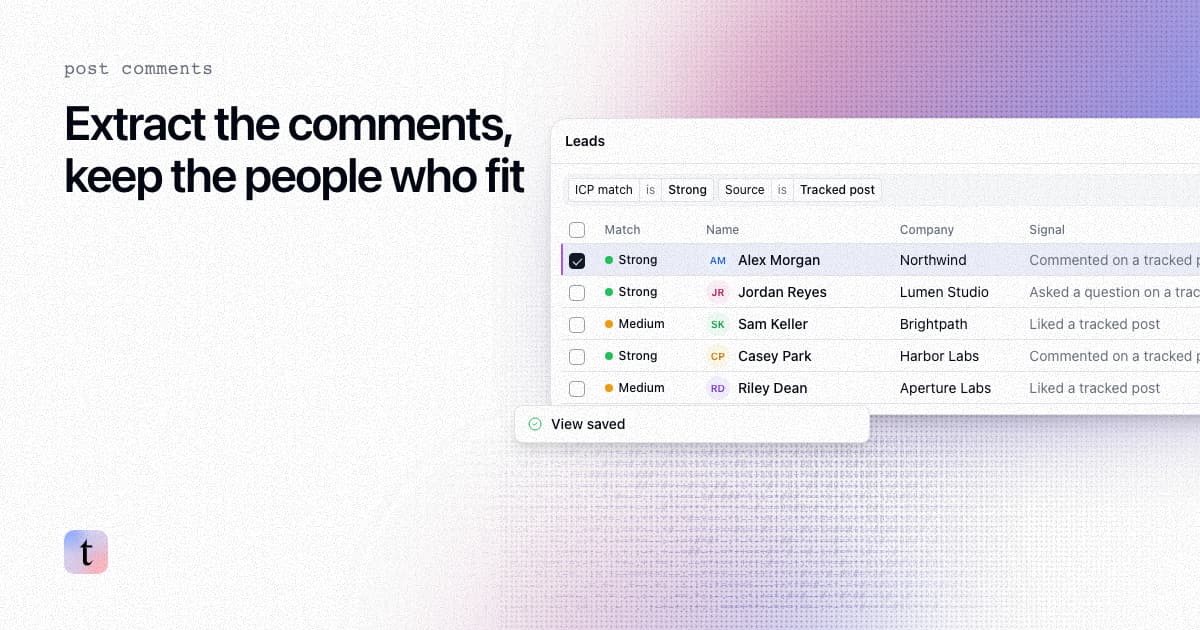
How to extract comments from a LinkedIn post, and keep only the commenters who fit your ICP
Four ways to extract comments from a LinkedIn post, what each returns and risks, and how to keep only the commenters who fit your ICP.
How to find leads from the people who engage with a LinkedIn company page
Most company page engagers are employees, job seekers and peers. How to find the ones who fit your ICP, with the post that brought each one in.