
Sales Navigator 'Viewed your Company Page recently': what the filter shows, its limits, and how to follow up
What the Sales Navigator 'Viewed your Company Page recently' filter shows, its limits, and how to follow up with a clearer reason than the page view.
LinkedIn Sales Navigator's Viewed your Company Page recently filter shows LinkedIn members who viewed your company's LinkedIn Page within the past 90 days. It is available only to Advanced and Advanced Plus users; members who turned off their Page visit visibility settings are not included. A page view is a weak signal by itself. It is warmer than a cold title search, and colder than a comment on a product post. Use the filter to shortlist, then look for a clearer reason before you write. For post-level engagers on a company page, use traxy company tracking.
Last checked: November 7, 2026.
What the Sales Navigator company page viewer filter is for
Sales teams asked for a way to find people who showed interest in the company presence on LinkedIn. Sales Navigator lead search exposes filters around company page activity, documented in LinkedIn's Sales Navigator filter help (filter definitions) and discussed in LinkedIn's Sales Navigator community as a warmer-prospect angle.
In practice teams use it to:
Prioritize outreach inside an existing territory
Find visitors who are not yet in the CRM
Combine viewer activity with title and seniority filters
It is still Sales Navigator search-led discovery. You get candidates. You still need a message reason.
Limits you should assume
Treat these as hard constraints unless LinkedIn's help page for your account says otherwise:
Privacy and visibility. Members who turned off their Page visit visibility settings are not included. LinkedIn does not hand you a complete analytics dump of anonymous traffic as named leads.
Recency window. LinkedIn documents a lookback of the past 90 days for Viewed your Company Page recently.
Plan availability. LinkedIn documents this filter as available only to Advanced and Advanced Plus users.
Weak intent. Opening a Company Page can mean hiring research, vendor browsing, competitor checks, or idle clicking. It is not a demo request.
No post context. A viewer filter does not tell you which post, product page, or employee profile they cared about.
If your follow-up says "saw you checking us out" without more evidence, many buyers will find it creepy. Prefer a public post they engaged with when you have one.
How to follow up without overclaiming
Better patterns:
Pair the viewer list with a recent company post they also liked or commented on
Reference a public initiative on the Company Page (event, product launch) without claiming you watched them browse
Use the viewer list only as a priority sort inside accounts you already target
Safer first line shape:
Working with [role] at teams evaluating [topic]. Noticed [company] has been active on [public theme]. Open to a short compare?
Avoid:
Saw you viewed our Company Page yesterday...
Unless your legal and brand teams explicitly want that framing, and your Sales Navigator UI makes the view explicit to both sides.
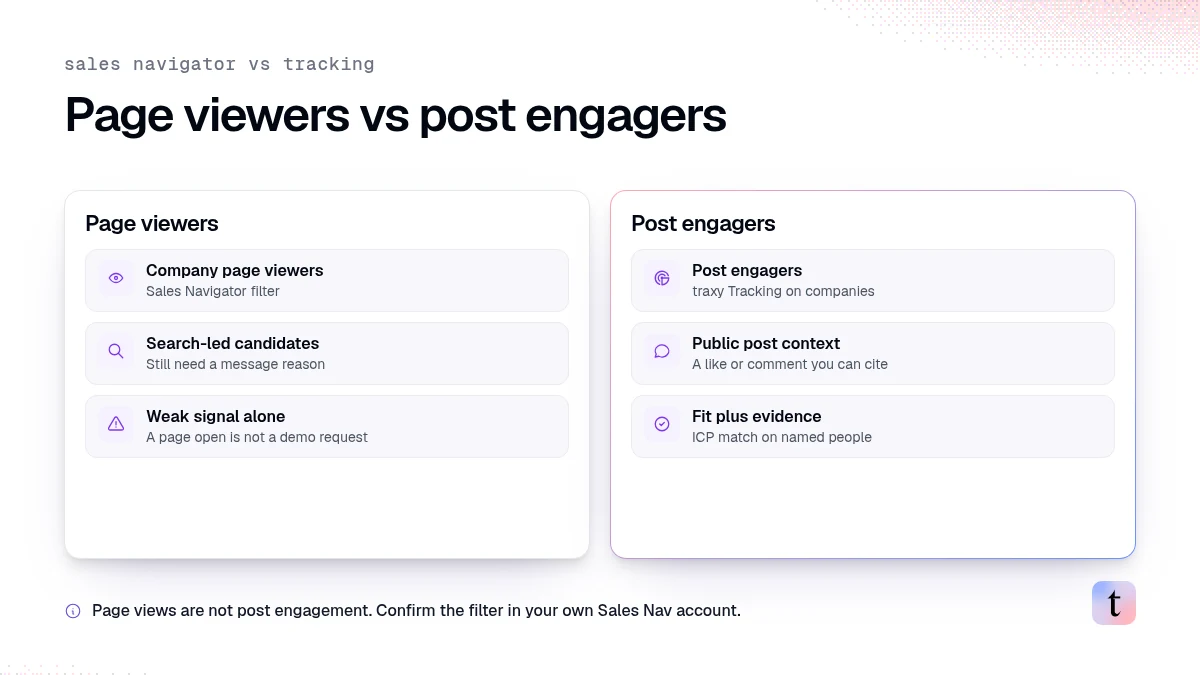
Page viewers vs post engagers
Signal | Where you see it | Strength | traxy role |
|---|---|---|---|
Viewed Company Page | Sales Navigator filter | Weak to medium | Not a traxy claim |
Engaged with a company post | Post analytics / engagement tools | Medium to high when fit matches | Track the company or post in traxy |
Asked a question in comments | Post comments | High when on-topic | Social intent search / tracked posts |
traxy Tracking for companies is about people engaging with that company's LinkedIn posts, not about reconstructing anonymous page traffic (Tracking docs). The published walkthrough is leads from LinkedIn company page engagers.
Message tests worth running
Run a small A/B on the same ICP:
A: Viewer filter only, neutral first line about the public theme on your Company Page
B: Engagers on a specific company post, first line cites the post
Measure replies and negative reactions, not just acceptance rates. Keep A only if reply quality holds and brand feels comfortable.
For content agencies proving LinkedIn ROI
Company Page viewer lists rarely help a ghostwriting agency show content value. Clients care which posts attracted the right titles. Prefer:
Aggregate audience mix (Ordinal + traxy)
Named engagers from tracked posts
Slack or CRM handoff of those engagers
See Ordinal audience breakdown and client lead report.
Source: LinkedIn filter definitions
LinkedIn's own filter definitions, checked November 7, 2026, specify the past 90 days, Advanced and Advanced Plus availability, and exclusion of members who turned off Page visit visibility. These details come from LinkedIn, not practitioner comparisons.
Suggested workflow for HubSpot or CRM teams
Run the Sales Navigator viewer filter for your territory
Intersect with ICP titles
Check whether those people also appear as engagers on recent posts (Sales Navigator activity, native analytics, or traxy)
Write only when you have a public artifact to cite
Log the activity in your CRM with the true source field (viewer vs engager)
For HubSpot tooling categories, see best LinkedIn tools for HubSpot.
FAQ
Does this replace website visitor identification?
No. Company Page views on LinkedIn are not the same as deanonymized website visits. Different products, different privacy rules.
Can traxy show Company Page viewers?
Do not claim that. Claim company post engagers via Tracking, which is documented.
Should agencies use this for clients?
Only if the client owns Sales Navigator access to that Company Page and agrees on messaging rules. Post engager lists are usually clearer for content agencies proving ROI.
Next step
If you already pay for Sales Navigator, test the viewer filter on a small territory and measure reply quality against a control list. For clearer LinkedIn reasons, track company posts in traxy and message people whose engagement you can open and cite.
Keep reading
All Buyer Intent & Signals guides
Buyer Intent Signals (2026): What Buying Signals Are, Examples by Type and How Sales Teams Act on Them
Buyer intent signals explained: what buying signals are, examples by type, how reps act on each one and a simple scoring framework to prioritize accounts.
Firmographic, technographic and engagement data: what each tells you about a B2B lead, and what it misses
Firmographic data describes a company, technographic data its tools, engagement data what a named person did. How to use all three to pick who to contact.
How to find leads from competitor LinkedIn posts and reach them on LinkedIn and email
Track competitor LinkedIn profiles or one post, qualify the people who engage, look up work emails where available, and approve LinkedIn and email outreach.