
Best LinkedIn tools for HubSpot (2026): logging vs sequencing vs triggering, and where engagement-led discovery fits
Best LinkedIn tools for HubSpot by job: logging, sequencing tasks, workflow triggering and engagement-led discovery, and how leads get into HubSpot via routes.
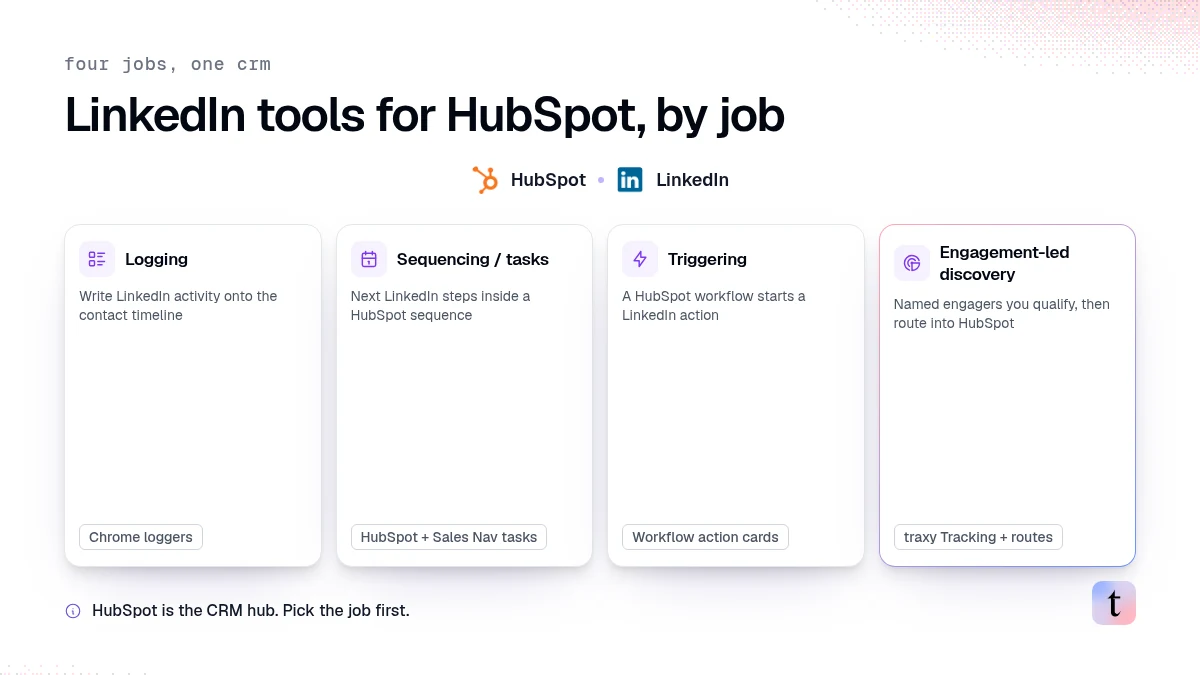
If your CRM is HubSpot, the best LinkedIn tool depends on the job you need done. Logging tools write LinkedIn activity onto HubSpot timelines. Sequencing tools (including HubSpot's own Sales Navigator steps) create tasks or multi-touch campaigns. Triggering tools start LinkedIn actions from a HubSpot workflow. Engagement-led discovery finds people who already reacted to posts you care about, then hands named leads into HubSpot after you approve the route. traxy sits in that last category: signal-based outbound on autopilot finds fit plus evidence on LinkedIn, and you send qualified leads into HubSpot through Zapier, a webhook, n8n, or Clay. There is no native HubSpot send button inside HubSpot for traxy.
Last checked: November 5, 2026.
What do LinkedIn tools for HubSpot actually do?
A Nov 3, 2026 comparison from FirstTouch splits the market into four jobs: triggering, logging, sequencing, and automation (FirstTouch). That framing is useful even if you disagree with their shortlist.
Use this version:
Job | What success looks like | Typical tools |
|---|---|---|
Logging | Manual LinkedIn activity shows up on the HubSpot contact timeline | Chrome loggers such as Hublead or Surfe |
Sequencing / tasks | Reps get next LinkedIn steps inside a HubSpot sequence | HubSpot + Sales Navigator task steps; email-first sequencers with LinkedIn touches |
Triggering | A HubSpot workflow event starts a LinkedIn action | Native HubSpot action cards from a LinkedIn workflow vendor |
Engagement-led discovery | Named people who engaged with relevant posts become leads you can route into HubSpot | traxy Tracking, Signals, Social intent search, then Zapier/webhook routes |
HubSpot's own guidance still treats LinkedIn Sales Navigator as task creation inside sequences, not as automatic LinkedIn sends (HubSpot LinkedIn automation guide, updated November 3, 2026; HubSpot KB).
If you only ask "what integrates with HubSpot," every category looks the same. Name the job first.
Related: best LinkedIn CRM integrations and Sales Navigator + HubSpot.
Logging: when a Chrome extension is enough
Pick a logger when:
Reps already work LinkedIn by hand
Managers need timeline visibility for coaching and reporting
You do not need LinkedIn messages started from a HubSpot workflow
Limits:
Logging does not find new people
Logging does not prove ICP fit
Logging does not create an engagement reason you can cite
A logger is visibility. It is not a lead source.
Sequencing and Sales Navigator tasks: what HubSpot does natively
HubSpot can create LinkedIn steps as tasks when Sales Navigator is connected. That helps a rep stay organized. It does not mean HubSpot sent the connection request or message for you.
Use this path when:
Your team lives in HubSpot sequences
You want reminders next to email steps
A human still opens LinkedIn to act
Do not treat a completed task as proof of a qualified lead.
Triggering: HubSpot workflows that start LinkedIn actions
Some vendors add HubSpot workflow action cards so a CRM event can start a LinkedIn visit, connection request, or message. FirstTouch's Nov 3 guide positions that as its HubSpot-native wedge, and notes HubSpot plans with workflows are required for those cards (FirstTouch).
That path is for teams that already know who to contact and want LinkedIn touches fired from CRM stages.
It does not answer:
Who engaged with a competitor post yesterday
Which commenters match your ICP
What evidence you can safely cite in the first note
Triggering moves known contacts. Discovery still has to find them.
Engagement-led discovery: where traxy fits
traxy is built for LinkedIn engagement as the reason to reach out.
Typical loop:
Track people, posts, or companies in Tracking (relationship tags include Competitor, Teammate, Influencer, Investor, and Custom)
Or search engagements in plain English with social intent search
Qualify against lead criteria (ICP match of at least 50%)
Review evidence before outreach
Route approved leads into HubSpot through Zapier, a webhook, n8n, or Clay (integrations overview)
Engagement is relevance, not proof of budget. Treat it as a reason to start a conversation, not as a closed deal.
For the HubSpot handoff pattern itself, see how to route LinkedIn engagement signals into HubSpot.
How should a HubSpot team choose?
Answer these in order:
Do we need new leads, or only CRM hygiene? Hygiene points to logging. New leads point to discovery.
Do we already have the people? Yes: sequencing or triggering. No: engagement-led discovery or Sales Navigator search.
Must LinkedIn fire from a HubSpot workflow? That is a triggering product. traxy is not that product.
Do we need named engagers with inspectable posts? That is traxy's job, then a route into HubSpot.
Will a human approve outreach? Keep review and launch in the tool that prepares the campaign (review and launch).
Many teams run two tools: one for discovery, one for CRM logging or sequencing. Running several LinkedIn automation clients on the same sender account raises restriction risk. Keep one active automation path per LinkedIn account.
What this page does not claim
No native HubSpot workflow action cards from traxy (no HubSpot page in docs.traxy.ai as of November 5, 2026)
No pricing for HubSpot seats, Sales Navigator, or any LinkedIn vendor
No guarantee that every engager becomes a HubSpot contact with a work email
No claim that LinkedIn engagement equals purchase intent
FAQ
Can HubSpot sequences send LinkedIn messages automatically?
No. HubSpot's Sales Navigator connection creates task reminders inside sequences. Sending still happens in LinkedIn or through a LinkedIn vendor's action cards (HubSpot).
Does traxy replace Sales Navigator for HubSpot shops?
No. Sales Navigator is strong for title, account, and saved-search prospecting. traxy is strong when the reason to write is a post engagement or social intent hit. Many teams use both. See traxy vs Sales Navigator.
How do traxy leads get into HubSpot?
Configure a Zapier or webhook route for an audience, map the payload fields HubSpot needs, send a test event, then turn on delivery for qualified leads. Slack is available when the sales team wants alerts before CRM create.
Is engagement the same as HubSpot lead status?
No. HubSpot lead status is a CRM field. A LinkedIn like or comment is evidence of relevance. Map them carefully so reps do not treat every engager as sales-ready.
Next step
If HubSpot already holds your contacts and you need better LinkedIn reasons to write, start with traxy on Tracking or social intent search, approve what looks like a fit, then route into HubSpot. If you only need timeline visibility for manual LinkedIn work, pick a logger and keep discovery separate.
Keep reading
All LinkedIn Lead Generation guides
LinkedIn Lead Generation (2026): What It Is, Strategy, Tips and Tools for B2B
What LinkedIn lead generation is, a 7-step B2B strategy, the 5 main tactics, tips, tools and metrics, plus every LinkedIn lead generation guide we publish.
Claude MCP servers for sales teams (2026): what each one reads and does, and how to connect traxy
Claude MCP servers for sales by job: lead finding, contact data, CRM and LinkedIn. What each reads and changes, and how to connect traxy to Claude over OAuth.
n8n LinkedIn lead workflow: send qualified LinkedIn leads from traxy into n8n with signed events
Send qualified LinkedIn leads from traxy into an n8n Webhook node with signed events: route a saved view, verify, dedupe and branch on the event type.