
Claude MCP servers for sales teams (2026): what each one reads and does, and how to connect traxy
Claude MCP servers for sales by job: lead finding, contact data, CRM and LinkedIn. What each reads and changes, and how to connect traxy to Claude over OAuth.
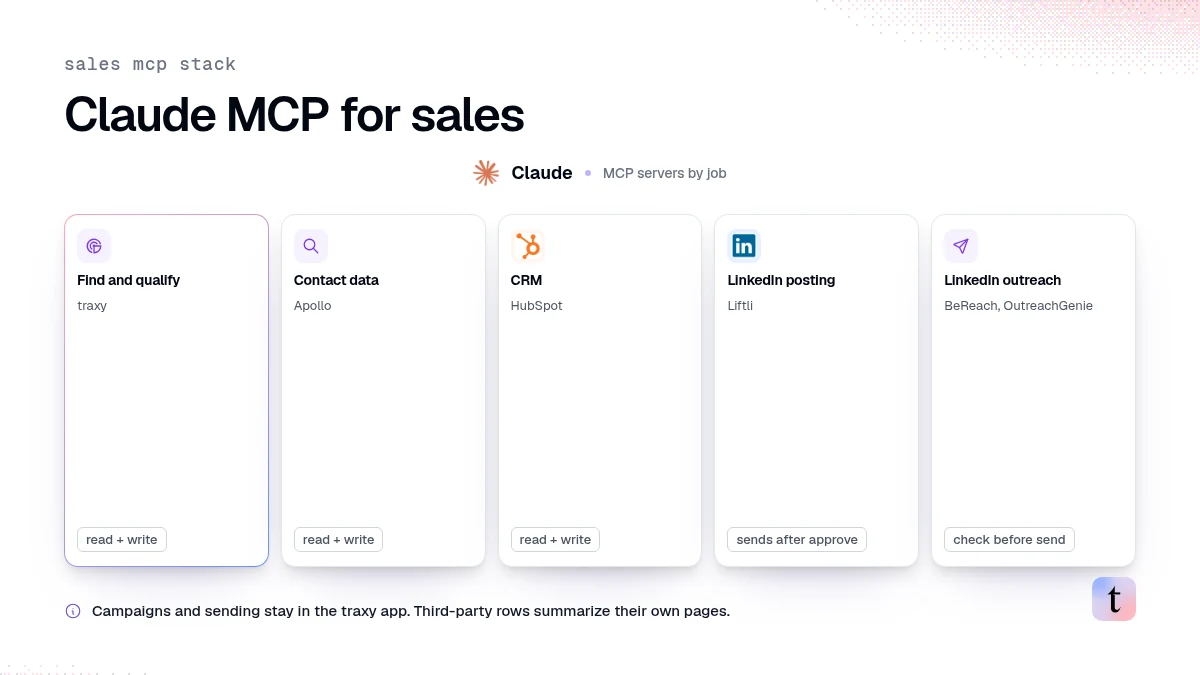
Sales teams use Claude MCP servers to give Claude access to the systems they already work in. Pick them by job: one to find and qualify leads, one for contact data or sequences, one for the CRM, and one for LinkedIn posting or outreach if you need it. Check three things for each server: what it can read, what it can change or send, and whether it asks before acting. traxy's MCP server covers finding and qualifying leads from LinkedIn engagement, reading their signals and updating targeting, with campaigns and sending kept in the traxy app.
Last checked: November 6, 2026.
What an MCP server does for a sales team
The Model Context Protocol is an open standard that lets AI assistants like Claude discover and call tools in other systems. A server exposes those tools. Claude asks the server what it offers and calls a tool mid-conversation, such as "list my qualified leads" or "create a contact."
For sales, that means you can ask Claude a question that spans systems: "Which leads engaged with our competitor's posts this week, and are any of them already in HubSpot?" Claude calls one server for the leads and another for the CRM.
ContentIn's glossary entry, updated October 30, makes a point that matters for LinkedIn in particular: LinkedIn does not publish an official MCP server. Every LinkedIn option is third-party, and the main difference is whether it uses LinkedIn's API or your logged-in session.
Claude MCP servers for sales, by job
Job | Example server | What it reads | What it can change or send |
|---|---|---|---|
Find and qualify leads from LinkedIn engagement | traxy | Qualified leads, signals, engagement summaries, tracked profiles, post analytics, account reports | Update ICP and Signal Brief, add tracked profiles, start a confirmed discovery run, request contact lookup, queue a lead to a webhook destination |
Contact data and sequences | Apollo MCP | Contacts, companies, sequence performance | Lists, contact records, sequences, tasks (per Apollo's page) |
CRM | HubSpot MCP server | Contacts, deals, engagements | Read and write CRM data (per HubSpot's developer page) |
LinkedIn posting | Liftli | Your LinkedIn posts | Plan, publish and schedule posts through LinkedIn's official API, after you approve |
LinkedIn outreach | BeReach, OutreachGenie | People search and prospects | Messages and campaigns, with different approaches to sending |
Descriptions of third-party servers summarize their own pages as of November 6, 2026.
The traxy MCP server
traxy's public MCP catalog has 50 tools before scope and workspace filtering (MCP tools). Grouped by what a sales team would ask:
Leads and accounts. List leads with filters, read one lead, read its signals and engagement summaries, read account reports, apply a lead action such as snooze, done, good fit or bad fit.
Discovery. Read discovery status and capacity, list runs and candidates, start a confirmed run.
Targeting. Read and update the active ICP and Signal Brief, with version history.
Tracking. List, add, update, remove and restore tracked LinkedIn profiles.
Content and analytics. Post analytics, qualified leads for one post, meetings attributed to traxy leads.
Integrations. Create a Webhook, Clay, n8n or Zapier destination and queue a lead for delivery.
Some actions need explicit confirmation. Starting a discovery run or qualifying a LinkedIn post requires confirmLeadUsage: true after you agree that new qualified people may use your workspace capacity. Marking a lead done needs confirmDone: true. Contact enrichment needs an explicit request.
Campaigns and sending stay in the traxy app, where you test a campaign and approve the launch (review and launch).
How to connect traxy to Claude
In traxy, open Integrations > Claude and choose the app or terminal instructions.
Copy the MCP URL,
https://api.traxy.ai/api/v1/mcp.Add it in Claude as a remote custom connector.
Sign in to traxy when prompted, choose the default workspace and any others, and review the requested actions.
Approve, return to Claude and confirm the connector is available.
No traxy REST API key is needed, and a REST key is not accepted as an MCP credential (connect Claude, connect an AI client). traxy also provides guides for Codex, Cursor, Grok, OpenCode, Pi and Ollama.
Start with a read: "List my authorized traxy workspaces, then show five qualified leads from the workspace I select." Each scoped call uses an explicit workspace or the connection's original default, not the workspace you last opened in the app (FAQ).
For a walkthrough, see find and review LinkedIn leads from Claude.
Prompts that use more than one server
"Show me this week's Warm leads from traxy, then check which ones already exist in HubSpot."
"Pull the qualified leads from our last post in traxy and draft a short summary of who engaged for the client report."
"Read our traxy Signal Brief and suggest two topics we are missing, based on the last 30 leads we marked bad fit." Ask Claude to show the proposed change before applying it.
"For the five traxy leads I marked good fit today, request email lookup and tell me which ones came back."
How to choose Claude MCP servers safely
Check read versus write
A read-only server can only report. A write server can change records or send. Decide which jobs you want Claude to perform without a click from you, and keep sending behind an approval step.
Check how LinkedIn is reached
ContentIn describes three families of LinkedIn MCP servers: open-source servers that scrape, aggregator bridges such as Zapier or Composio, and hosted servers from LinkedIn tools. Liftli says it goes through LinkedIn's official API for publishing. OutreachGenie says Claude works with records in its workspace, does not browse LinkedIn and sends through a Chrome companion in your browser. Read each provider's description of how it touches your account, and read it first.
Check scopes and workspaces
In traxy, existing connections do not gain workspaces or scopes automatically, and you authorize again to expand access. Each tool call also enforces your current role (connect an AI client).
Check what counts against limits
In traxy, a person uses workspace capacity when first delivered as a visible qualified lead. Contact lookups, exports and repeat signals do not count the person again (how qualification works).
FAQ
Is there an official LinkedIn MCP server?
No. LinkedIn does not publish one. Every LinkedIn MCP option is third-party.
Can Claude find leads on LinkedIn?
Claude on its own cannot see who engaged with a LinkedIn post. With the traxy MCP connection, Claude can read qualified leads traxy found from LinkedIn engagement, their signals and the posts behind them.
Can Claude send LinkedIn messages through traxy?
No. Through MCP, Claude reads leads and updates targeting and tracking. Campaigns and sending stay in the traxy app, where you approve the launch.
Does the traxy MCP server work with Codex?
Yes. traxy has a Codex setup guide that uses the same OAuth authorization.
Next step
Connect traxy to Claude, ask for five qualified leads, and open one lead's signals. Add a CRM or sequencing server only when you have a question that needs both.
Keep reading
All LinkedIn Lead Generation guides
LinkedIn Lead Generation (2026): What It Is, Strategy, Tips and Tools for B2B
What LinkedIn lead generation is, a 7-step B2B strategy, the 5 main tactics, tips, tools and metrics, plus every LinkedIn lead generation guide we publish.

Best LinkedIn tools for HubSpot (2026): logging vs sequencing vs triggering, and where engagement-led discovery fits
Best LinkedIn tools for HubSpot by job: logging, sequencing tasks, workflow triggering and engagement-led discovery, and how leads get into HubSpot via routes.
n8n LinkedIn lead workflow: send qualified LinkedIn leads from traxy into n8n with signed events
Send qualified LinkedIn leads from traxy into an n8n Webhook node with signed events: route a saved view, verify, dedupe and branch on the event type.