
Most LinkedIn reach now arrives after the first two hours. When should you pull leads from a post?
Van der Blom's Nov 2026 data: 85% of LinkedIn post reach arrives after the first two hours. Check engagers at 2 hours, day 2 and day 7, or let traxy watch.
A LinkedIn post now gets most of its reach after the first two hours. Richard van der Blom's November 2026 Algorithm Insights update, built on more than 1.2 million posts, puts that share at 85 percent. So the people who see and engage with a post keep arriving for days. If you pull the list of engagers once, an hour after posting, you miss most of the people who will engage with it. A better schedule is a quick check at two hours to answer comments, another on day two, and a full review after seven days. In traxy, you can track the post itself or track the person who posted it, and only the people who fit your ICP come back as leads.
Last checked: November 2, 2026.
What changed about LinkedIn post reach in 2026?
On November 1, 2026 Richard van der Blom published an early chapter of the November update to his Algorithm Insights Report (LinkedIn newsletter #80). He found that in 2026, 85 percent of a post's reach arrives after its first two hours. He credits the Interest Graph, the part of LinkedIn's feed that keeps finding new readers for a post well after it goes live.
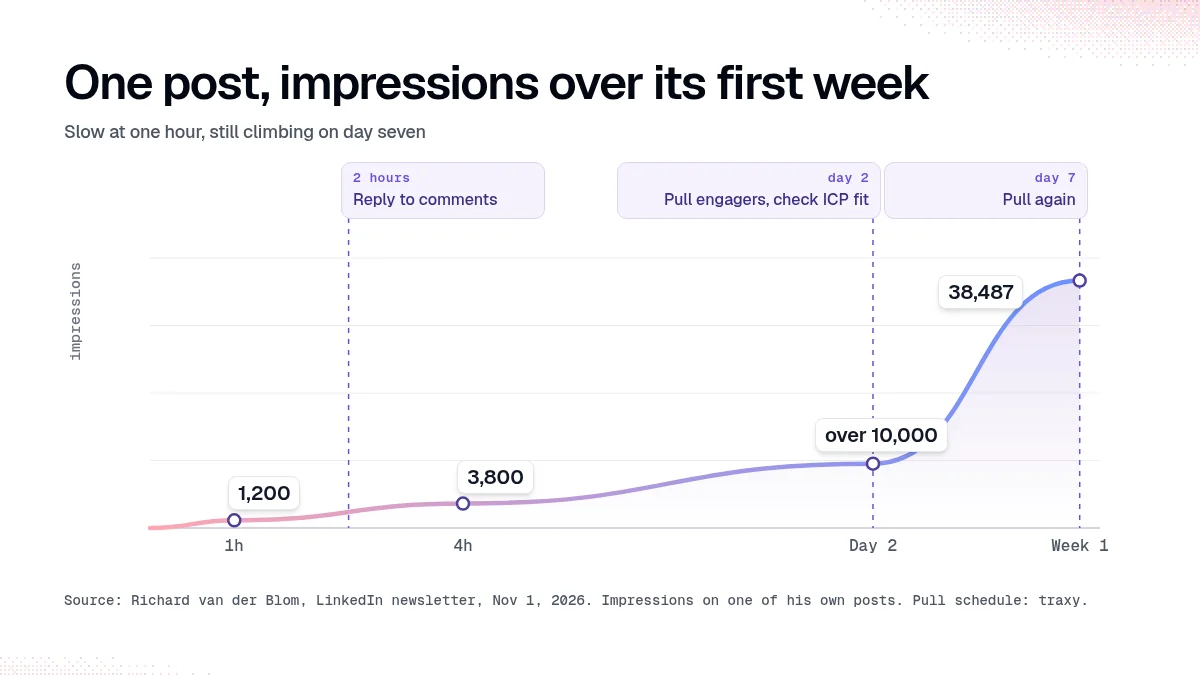
His own post shows the curve:
Time after posting | Impressions | What he would normally see |
|---|---|---|
1 hour | 1,200 | About 3,000 |
4 hours | 3,800 | About 8,000 |
Day 2 | Over 10,000 | |
1 week | 38,487, with 633 reactions and 189 comments |
He says about 80 percent of reactions and comments on his posts normally arrive in the first 48 hours. On this post, engagement doubled after that window closed. On day three and day four, two companies contacted him about training, and both mentioned the post.
Three other numbers from the same chapter matter for anyone using posts to find leads:
Of posts with no substantial engagement in the first 120 minutes, only 8 percent end up above the creator's average. The first two hours still set the speed.
A creator's own average from March to June explained 51 percent of the differences in reach between their posts in July and August.
Fast replies to comments brought 64 percent more engagement but added less than 10 percent to reach.
These figures come from one researcher's dataset. They are not LinkedIn's own numbers. They match what LinkedIn has said about its feed moving toward interest-based distribution, covered in our guide to the 2026 LinkedIn algorithm.
Why does this matter if you find leads from post engagement?
Most people who use LinkedIn posts for prospecting check the post once, scroll the likes and comments, and pick out a few names. That habit made sense when most engagement landed in the first hour. Now it means you see the early crowd, who are mostly your own network, and miss the readers the feed finds later.
Those later readers are often the more useful ones. Van der Blom's two enquiries came on days three and four, from people outside his usual circle. If your post is about a problem your offer solves, the people who find it on day three are as likely to fit your buyer profile as the people who liked it in minute ten. They are less likely to be colleagues, friends and other creators.
The same applies when you pull leads from someone else's post: a competitor, a creator your buyers follow, or a client you write for. A post that looks quiet at lunchtime can have a different audience by Thursday.
When should you check who engaged with a LinkedIn post?
A simple schedule that fits the new curve:
At two hours. Reply to comments. This is where conversations and DMs start. Don't send outreach to anyone yet off a like.
On day two. Pull the engagers and check who fits your ICP. Comments carry more context than likes, so start with the commenters.
On day seven. Pull again. This is when you see the people the feed found after the first wave, and the point where van der Blom says to judge the post.
For your own posts, the day-seven check doubles as a content review. Look at how many of the engagers fit your buyer profile, alongside impressions. A post with fewer views and more right-fit engagers did more for you than a post that went wide with the wrong crowd.
How do you keep track of late engagers without checking by hand?
Checking every post three times by hand doesn't scale past a handful of posts a week. In traxy there are two ways to keep watching.
Track the post. Open Targeting, choose Posts under Tracking, select Track post and paste the URL (track people, posts and companies). Review the candidate scope before you confirm Find leads. Candidate counts describe people to evaluate, not a promised number of leads. The post view shows its engagements, the leads it produced and their ICP match.
Track the person who posts. Add the author's profile under People and pick a relationship: Competitor, Teammate, Influencer, Investor, or a custom label. Ongoing monitoring covers the five most recent posts the person publishes after you add them. For an older post outside that window, track the post on its own.
You can also do the same from chat. Ask trax: "Find leads from this post: [URL]". The walkthrough is in find leads from any LinkedIn post.
In both cases, traxy checks each engager against your lead criteria. A person qualifies only with an ICP match of at least 50 percent (how qualification works). If the same person engages on several posts, they still show up as one lead with several recorded signals.
What should you do with someone who engaged on day five?
Treat a late engager the same way as an early one. Check the evidence before you write to them.
They commented. Respond to what they said. A comment is the strongest public signal a post gives you.
They liked a post about a problem you solve. Use the topic as context, and don't claim they endorsed every point in the post.
They fit your ICP but the engagement is thin. Use a plain role-based introduction and leave the post out of it.
These rules come from traxy's signal cheat sheet. For message examples by signal type, see from a LinkedIn signal to a message you can back up.
Avoid messaging someone within the hour because they liked your post. It reads as surveillance, and with the new curve, you would be acting on the least representative slice of your audience.
Does the first hour still matter?
Yes, for speed. Van der Blom's data says the first 120 minutes decide how fast a post moves, and silence in that window is hard to recover from. His suggestions for that window:
Block at least 20 minutes on your calendar from the moment the post goes live.
Reply to as many comments as you can in the first two hours.
Pin your own comment as a second hook. In his data, a pinned fun fact reached 19 percent of a post's readers, an open question 18 percent, and a link 12 percent.
Repost once, about six hours after publishing, with a line of fresh context. He measured up to a quarter more reach from one self-repost, and a second self-repost of the same post cost visibility.
None of that changes when you should look for leads. The first hour is for conversation. The lead review happens after the feed has had time to work.
FAQ
How long does a LinkedIn post keep getting views in 2026?
For days. Richard van der Blom's November 2026 data says 85 percent of a post's reach arrives after the first two hours, and he recommends judging a post after seven days.
Is the LinkedIn "golden hour" still real?
It still sets the speed. Posts with no substantial engagement in the first 120 minutes rarely recover, according to the same report. It no longer decides how far a post goes.
When should I check who liked my LinkedIn post?
Reply to comments in the first two hours, then review engagers on day two and day seven. Late engagers can include people outside your network who fit your buyer profile.
Can traxy keep checking a post for new engagers?
Yes. Track the author's profile and traxy monitors the five most recent posts they publish after you add them. For an older post outside that window, track the post on its own.
Do I need to connect my LinkedIn account to find leads from posts?
No. Lead sourcing in traxy doesn't need a LinkedIn connection. Outreach needs a connected sender.
Related reading
Want the day-seven engagers without checking by hand? Track your next post in traxy.
Keep reading
All LinkedIn Lead Generation guides
LinkedIn Lead Generation (2026): What It Is, Strategy, Tips and Tools for B2B
What LinkedIn lead generation is, a 7-step B2B strategy, the 5 main tactics, tips, tools and metrics, plus every LinkedIn lead generation guide we publish.
Best LinkedIn tools for HubSpot (2026): logging vs sequencing vs triggering, and where engagement-led discovery fits
Best LinkedIn tools for HubSpot by job: logging, sequencing tasks, workflow triggering and engagement-led discovery, and how leads get into HubSpot via routes.
Claude MCP servers for sales teams (2026): what each one reads and does, and how to connect traxy
Claude MCP servers for sales by job: lead finding, contact data, CRM and LinkedIn. What each reads and changes, and how to connect traxy to Claude over OAuth.