
How to find B2B leads on LinkedIn without Sales Navigator
How to find B2B leads on LinkedIn without Sales Navigator: start from posts, comments and likes, qualify by ICP, then run LinkedIn and email outreach.
TL;DR: To find B2B leads on LinkedIn without Sales Navigator, stop starting from job title filters and start from what people do on LinkedIn: the posts they write, the comments they leave and the posts they like about the problem you solve, plus the people engaging with your competitors, the creators your buyers follow and your own profile. Keep only the people who fit your ideal customer profile (ICP), find their work email, then reach them over LinkedIn and email with a message that refers to what they said. traxy runs that whole workflow: it searches 71M+ scanned LinkedIn likes, posts and comments in plain English, keeps only people with a 50%+ ICP match, shows the post or comment behind every lead, and runs LinkedIn and email outreach from your own connected sender accounts once you approve the campaign.
LinkedIn and Sales Navigator facts in this guide come from LinkedIn's own pages, linked where they appear and checked November 2026. traxy wrote this guide and makes one of the tools in it.
How do you find B2B leads on LinkedIn without Sales Navigator?
You find them from LinkedIn activity instead of from a filtered search: look for people who are posting, commenting and liking about the problem you solve, check each one against your ICP, and reach out about the thing they said. That gives you fewer names than a title search, but each name comes with a reason to write to them.
The workflow has four steps, and the rest of this guide walks through each one:
Start from intent. Search for people talking about the need you meet, in plain English, and look at the post or comment behind each person.
Keep new people coming in. Track the competitors, creators, single posts and company pages your buyers engage with, so new engagers show up without a new search.
Qualify and enrich. Keep only the people who fit your ICP, then find their work email so you can reach them on two channels.
Run the outreach. Send LinkedIn and email sequences from your own accounts, built around the activity that put each person on the list, with a review step before anything sends.
You can do a small version of this by hand with a free LinkedIn account (see doing it by hand), or run it end to end in traxy. If you are comparing tools rather than looking for a method, our guide to the best Sales Navigator alternatives covers that.
Do you need Sales Navigator at all?
Not to find good B2B leads. Sales Navigator is built for searching LinkedIn's member base by who people are; if your question is who is showing interest right now, you need a different starting point, and Sales Navigator becomes optional.
Here is what Sales Navigator is for, in LinkedIn's own words. LinkedIn calls it "LinkedIn's B2B sales tool tailored for individual sellers and sales teams" and says you can "search with 50+ filters like function, seniority level, years at company, experience, and more" across "1+ billion members" (LinkedIn Sales Navigator page, checked November 2026). The same page lists lead and account recommendations, custom lists, alerts when saved leads change jobs or roles, InMail, and CRM features, some of which it says are only on the Advanced Plus plan.
LinkedIn's own prospecting guide describes two methods: account-based (filter companies by industry, headcount and annual revenue, save them to a list, then switch to leads) and lead-based (start from job function, title and seniority in Advanced Search, then add company filters). It also suggests turning on the "Posted on LinkedIn" toggle "to identify people who have recently posted on the network" (How to prospect with Sales Navigator, checked November 2026).
So Sales Navigator is strongest at the "who fits" question: titles, seniority, company size, saved lists. The job of finding leads also needs a "why now" answer, and the "Posted on LinkedIn" toggle tells you that someone posted, not that they posted about your problem. Without Sales Navigator, you start from the "why now" side and add the fit check after. For what Sales Navigator costs per plan, see our Sales Navigator pricing guide.
What does the job of finding a lead need?
A fit check: the person matches your ICP (role, seniority, company size, industry, location).
A reason to reach out: something they did recently that relates to your offer, such as a post about the problem or a comment on a competitor's post.
A way to contact them: a LinkedIn profile you can message and, ideally, a verified work email.
A message that fits the reason: outreach that refers to what they said, not a generic pitch to a title.
Filters cover the first point well. Activity covers the second, and it is the one most title-based lists are missing.
Step 1: How do you start from people already showing intent?
Search what people say on LinkedIn, not who they are. Describe the person and the need in plain English, then look at the post or comment that shows the need, and decide from that whether they are worth contacting.
In traxy this is Social Intent Search: a plain-English search across 71M+ scanned LinkedIn likes, posts and comments, where each person comes with the post or comment behind them. You type who you want and the need, for example "find me founders looking for AEO help", in traxy, through trax (the traxy agent in the app), or from Claude or ChatGPT through the traxy MCP. The 71M+ figure counts scanned likes, posts and comments, not people.
What to search for:
The problem in your buyer's words. "Struggling to hire a first SDR" finds different people than "sales hiring". Write the query the way someone would post about it.
Questions people ask in public. People asking for tool recommendations, agency referrals or advice on a problem you solve.
Complaints about the status quo. Posts and comments about what isn't working with the way they do it today.
Your category, combined with a role. "Heads of growth at SaaS companies talking about LinkedIn outbound" narrows the result to the people who would buy.
For each result, open the source. A comment that describes the problem in detail is a stronger reason to write than a like on a loosely related post. traxy also labels each lead Warm, Related or Activity by how strong the evidence is, so you can start with the strongest. If you want to compare this with keyword search, our guide to LinkedIn Boolean search vs social intent search shows when each one works better.
Step 2: How do you keep new engagers coming in?
Track the people, posts and company pages your buyers already engage with. Every new like or comment on a competitor's or creator's post is a person raising a hand in public, and tracking turns that into a steady source of new leads instead of a one-off search.
In traxy, Tracking (under Targeting) covers three kinds of sources:
People. Paste a LinkedIn profile URL and tag the relationship: competitor, teammate, influencer, investor or custom. traxy watches that profile's posts and qualifies the people who engage. Track your own profile too, so engagement on your posts becomes leads.
Single posts. Paste any LinkedIn post URL (yours, a competitor's, a creator's) and get the engagers who fit your ICP. Use it for one viral post in your space or an older post you want to mine.
Company pages. Add a company by domain or LinkedIn company page, and traxy reads its LinkedIn page posts for engagers who fit your ICP. That finds people engaging with the page, not every employee or buyer at the company.
Each tracked profile shows the leads it surfaced, their ICP match and the posts they came from, so you can see which sources bring in good fits and drop the ones that don't (Tracking docs). You can also switch on Profile views under Targeting > Signals, so profile views of the sender accounts you connect become leads too. For the full approach, see how to find warm leads on LinkedIn.
Who to track first:
Two or three direct competitors whose founders or sales leaders post often.
The creators and newsletter writers your buyers read.
Your own founder's or team's profiles.
Company pages of competitors or partners whose followers match your market.
Step 3: How do you qualify and enrich the leads you find?
Check every engager against your ICP before they count, then add a work email to the ones that pass. Activity without fit gives you students, vendors and peers; fit without activity gives you a cold list.
In traxy, you set the fit in Lead criteria (roles, departments, seniority and locations for people; size, industry, revenue, funding and keywords for companies, plus exclusions). Give traxy your website and it drafts the ICP and the signals to watch, and you fix anything that's off. Every person found is scored, and only people with an ICP match of 50% or higher become qualified leads (qualification docs). The ICP match is a fit score, not a chance that someone will buy, so read the source post before you write.
Then enrich:
Email lookup finds a verified work email for a lead, and phone lookup finds a phone number.
Auto-Enrich looks up contact data automatically for newly qualified leads. It does not backfill leads you already had.
Blocklist and Do not contact keep existing customers, partners and specific people out of discovery and outreach.
Save the leads you want to reach as a shared view with filters (for example Warm leads, director and above, last 30 days). Campaigns use shared views, so the audience updates as new leads come in.
Step 4: How do you run the LinkedIn and email outreach?
Send from your own connected LinkedIn and email accounts, with a message built around the activity that put each person on your list, and review the campaign before anything goes out. In traxy that means a campaign: you approve it once and it runs on its own, or you approve every message.
How a campaign works in traxy (LinkedIn outbound):
Connect your senders. Sending needs connected sender accounts: your LinkedIn accounts and mailboxes, with limits, active hours, ramp-up and email signatures (sender docs). A campaign does not bypass a sender's limits.
Create the campaign. In Outbound > Campaigns, or by asking trax. Pick the audience (a shared view), your offer and the research you want on each lead, such as whether they are hiring for a role or recently raised.
Let it research and group. The campaign researches each lead for the facts you asked for, groups leads by signal and prepares a personalized message variant for each group, using the evidence.
Test on sample leads. The test runs the plan on sample leads so you can check the research and drafts. Nothing is sent.
Review the launch. Before launch you see who joins, who is skipped (held by another campaign or contacted before), the sender, the steps and the delivery mode.
Pick the delivery mode. Approve every message in a review queue, or let the approved campaign send on its own. This is what traxy means by outreach on autopilot: the campaign runs by itself only after you approve it.
Sequences mix LinkedIn and email steps, and waits can depend on events like a connection request being accepted. Replies, unsubscribes and hard bounces stop the sequence, and every conversation lands in one inbox across LinkedIn and email, where you can reply or pause a lead's sequence to take over. You can run many campaigns at once on different signals; they run in priority order so one lead never gets two campaigns at the same time.
You can also run this from your AI chat. Through the traxy MCP, Claude, ChatGPT, Codex, Cursor or Grok can draft, test and launch campaigns, manage sequences and senders and reply in the inbox, and the AI waits for your yes before anything sends or launches.
What should the first message say?
Refer to the activity, briefly, and ask one small question. If someone commented that their team is struggling to book meetings from LinkedIn, the first message names that comment and asks how they handle it today. Don't open with your product, and don't quote their post back at length. traxy prepares drafts from the source post and the research on each lead, and you check them in the test and ask trax to revise, or edit them in the review queue.
Can you do this by hand with a free LinkedIn account?
Yes, for a small number of accounts. You can read posts in your niche, open the comments on competitors' and creators' posts, and note the people who fit. It works, but it is slow, and heavy profile searching can hit LinkedIn's commercial use limit.
LinkedIn's help page says the limit applies when "your activity on LinkedIn indicates that you're likely using LinkedIn for commercial use, like hiring or prospecting." It counts searching for profiles on LinkedIn.com and mobile, browsing profiles through "People Also Viewed" and viewing member profiles on the People tab of LinkedIn Pages. It doesn't count searching by name in the top search box, browsing your 1st-degree connections or searching for jobs. The free usage resets "at midnight PST on the 1st of each calendar month", and LinkedIn points to Premium Business, Recruiter Lite and Sales Navigator for more searches (LinkedIn commercial use limit, checked November 2026).
A manual routine that stays focused:
List 10 to 20 profiles and pages your buyers engage with: competitors, creators, partners.
Each day, open their newest posts and read the comments first. Comments carry more intent than likes.
Open the profiles of commenters who look like a fit and check role, company and size against your ICP.
Write down the person, the post and what they said in a sheet, so your message can refer to it.
Send a connection request or message that refers to the comment, and follow up by email where you have one.
The manual version breaks down when you want more than a handful of leads a week, want email as a second channel, or need several people on your team working the same list without contacting the same person twice. That is the point where a tool that tracks, qualifies and sends from one place saves time.
When do Sales Navigator or Boolean search still fit better?
When you already know exactly who you want and activity doesn't matter. Starting from LinkedIn activity is not the right method for every job, and traxy does not replace every Sales Navigator feature.
Named-account selling. If you sell to a fixed list of target accounts and need every relevant person at each one, Sales Navigator's account lists, lead suggestions and saved searches fit better. Tracking a company page in traxy finds people engaging with its posts, not everyone who works there.
Buyers who don't post or engage. In markets where buyers stay quiet on LinkedIn, there is little activity to start from, and filters on title, seniority and company are the better starting point.
Job changes and relationship paths. Sales Navigator's alerts on saved leads' job or role changes and its connection insights and TeamLink for warm paths are built into LinkedIn itself (LinkedIn's prospecting guide).
InMail. LinkedIn describes InMail as a Sales Navigator feature that "makes it possible to reach prospects directly", with monthly InMail credits (Sales Navigator page).
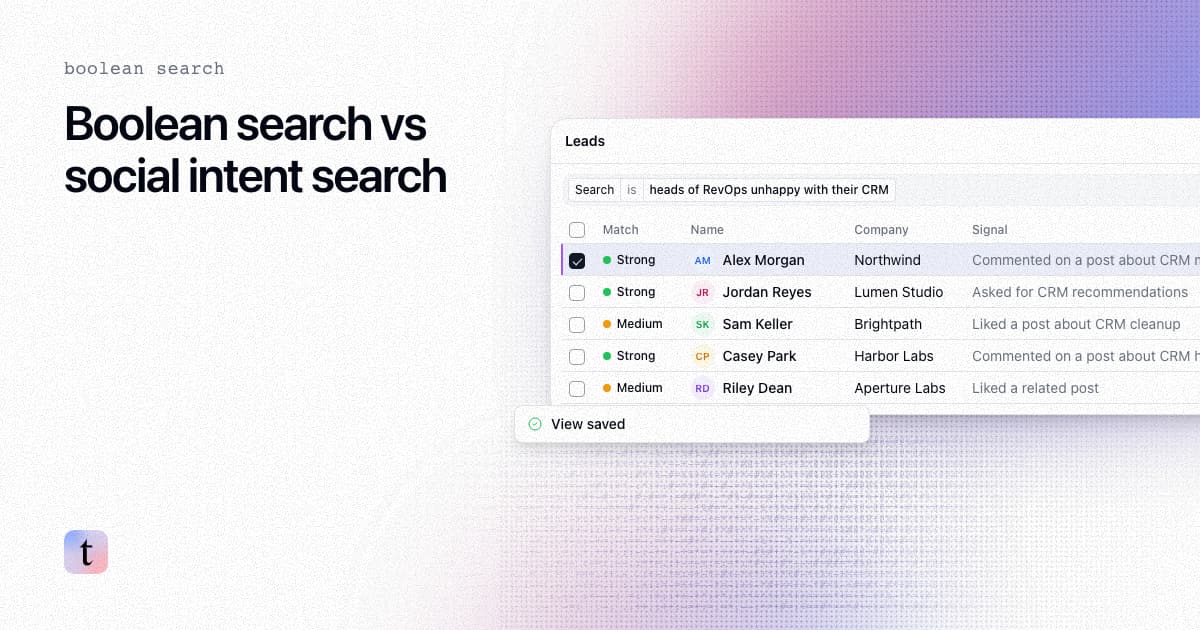
Exact keyword matching. If you need every profile with a specific title string or certification, a Boolean search fits better than a plain-English intent search. See Boolean search vs social intent search.
Many teams use both: filters to define the accounts, and activity to decide who to contact this week and what to say. For a tool-by-tool view, see the Sales Navigator alternatives guide and traxy vs Sales Navigator.
What are the limits of finding leads from LinkedIn activity?
Activity tells you someone has a reason to talk, not that they are ready to buy. Keep these limits in mind when you plan volume and messaging:
Engagement is not a decision to buy. A like on a post about your problem is the weakest signal; a detailed comment or their own post is stronger. Keep the first ask small.
Volume depends on your market. A niche with few active posters gives fewer leads than a broad one. Tracking more sources and widening the search helps; lowering your ICP bar mostly adds poor fits.
Fit score is not a forecast. A 50%+ ICP match means the person fits your criteria, not that they will reply.
Sending has rules. Sender limits, active hours and ramp-up apply to every campaign, and no tool can promise zero LinkedIn restriction risk. Send at a pace that matches your account.
Signals outside LinkedIn come from research. In traxy, hiring, funding and job-change signals come from research on each lead in a campaign, not from a live event feed.
FAQ
Can you find B2B leads on LinkedIn without Sales Navigator?
Yes. Start from LinkedIn activity: people posting, commenting and liking about the problem you solve, and people engaging with your competitors and the creators your buyers follow. Check each person against your ICP, find their work email and reach out about what they said. traxy runs this from search to outreach.
Is there a free way to find leads on LinkedIn?
You can find leads by hand with a free account by reading posts and comments in your niche and checking commenters' profiles. LinkedIn's help page says heavy profile searching for prospecting can hit its monthly commercial use limit, which resets on the 1st of each month (LinkedIn help, checked November 2026). For traxy plans, see pricing.
How is this different from Sales Navigator's "Posted on LinkedIn" filter?
LinkedIn's guide describes that toggle as a way to find people who have recently posted on the network. It tells you someone posted, not whether they posted about your problem. Social intent search looks for the topic and need, across likes, posts and comments, and shows you the source.
Does traxy need Sales Navigator?
No. traxy doesn't require Sales Navigator. It finds leads from LinkedIn activity and tracked sources, qualifies them against your ICP, and runs LinkedIn and email outreach from your own connected sender accounts.
Does traxy send messages without my approval?
No. You test the campaign on sample leads with nothing sent and review who joins before you approve the launch. After that, the approved campaign sends on its own, or you approve every message in a review queue. Replies, unsubscribes and hard bounces stop the sequence.
What is the 71M+ number in social intent search?
It is the number of scanned LinkedIn likes, posts and comments you can search, not a count of people or buyers.
Can I run this from ChatGPT or Claude?
Yes. With the traxy MCP connected, you can search social intent, list and research your leads, and draft, test and launch campaigns from Claude, ChatGPT, Codex, Cursor or Grok. The AI asks for your yes before anything sends or launches.
Related reading
Try it: see how social intent search finds the people already talking about your problem.
Keep reading
All LinkedIn Sales Navigator guides
LinkedIn Sales Navigator (2026): What It Is, Key Features and How to Use It to Find Buyers Who Are Already Engaging
LinkedIn Sales Navigator explained: what it is, its key features and plans, how to use it step by step, its limits, and every Sales Navigator guide we have.
Best Sales Navigator Alternatives for B2B
Compare the best LinkedIn Sales Navigator alternatives for B2B prospecting in 2026. Covers Apollo, Lusha, Cognism, traxy, and more with pricing and use cases.
LinkedIn Boolean search vs plain-English social intent search: when to use each
How LinkedIn Boolean search works, where it falls short for finding buyers, and when a plain-English social intent search finds people with a reason to talk.