
Trigify shut down. What to use now for LinkedIn social listening
Trigify closed on October 22, 2026 and nothing moved to HubSpot. How to rebuild each job it tracked (profiles, competitors, posts, company pages, keywords).
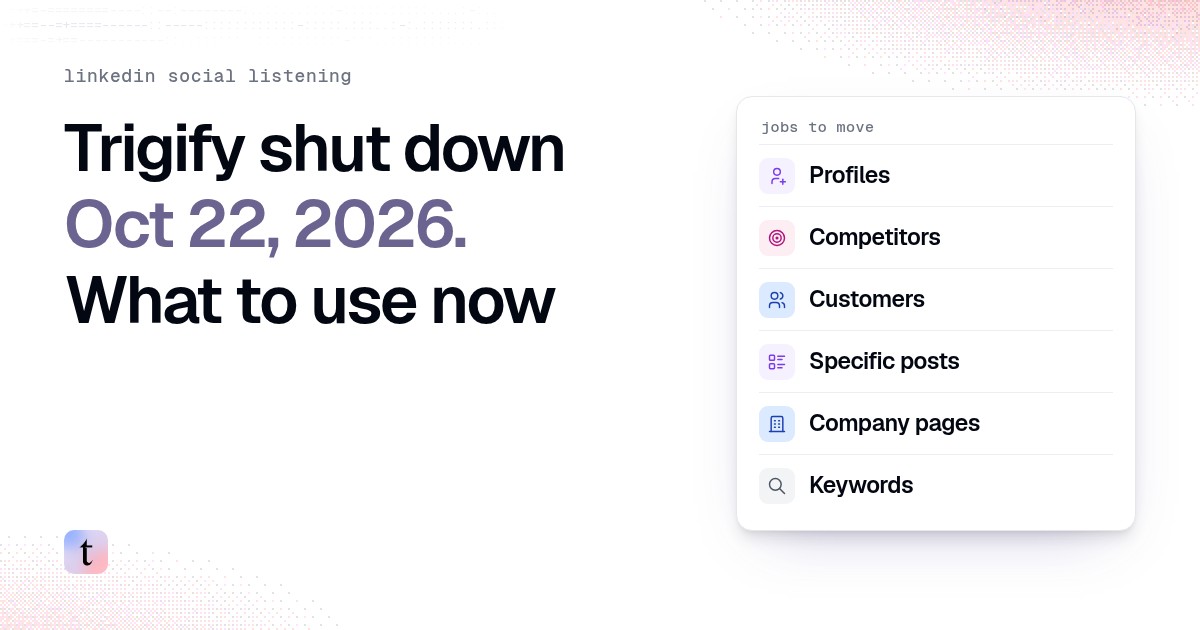
Trigify is no longer available. Its team joined HubSpot, and the standalone platform closed for most customers at 11:59pm BST on October 22, 2026. Accounts and data did not move to HubSpot, and monitoring, integrations and API access stopped at the cutoff. If you used Trigify for LinkedIn social listening, you need a new tool for each job it did: following profiles, competitors, customers, specific posts, company pages and keywords. traxy covers all six, with a relationship tag on each tracked profile, and returns the people who fit your buyer profile along with the post or comment behind each one. traxy can then reach them over LinkedIn and email from your own connected sender accounts.
These facts come from Trigify's own announcement, The Trigify team is joining HubSpot: Our next chapter on trigify.io, dated September 23, 2026 (checked November 2026). It says the Trigify team is joining HubSpot and the standalone platform is being retired, and that for customers on the standard notice period, access ended at 11:59pm BST on October 22, 2026. The same page says the Trigify product will not continue within HubSpot and accounts will not be migrated there.
Comparing more than two tools? See the best Trigify alternatives.
traxy runs your entire LinkedIn GTM end to end, from finding high intent leads from social intent to enriching and researching each one, to running relevant, personalized LinkedIn and email outreach to them on autopilot. The first half finds the leads: Signals, Tracking of profiles, posts and company pages, profile views and social intent search over 71M+ scanned LinkedIn likes, posts and comments, keeping only people with a 50%+ ICP match and showing the post or comment behind each lead. The second half reaches them: a campaign researches each lead, groups leads by signal and prepares a personalized LinkedIn and email sequence, sent from your own connected sender accounts. Autopilot starts only after you test the campaign on sample leads and approve the launch, or you approve every message in a review queue. For the full comparison of Trigify alternatives, including where another tool fits better than traxy, see the best Trigify alternatives.
Last checked: October 30, 2026.
What happened to Trigify?
Trigify announced on September 23, 2026 that its team was joining HubSpot and that the standalone platform would be retired (Trigify). The notice set the end of access for most customers at 11:59pm BST on October 22, 2026. Customers with different contract terms were told their own dates directly.
The parts that matter for anyone who relied on it:
What | What happened at the cutoff | Source |
|---|---|---|
Login and dashboard | Access ended for most customers on October 22, 2026 | |
Monitoring and signal collection | Stopped when access ended | |
Integrations and API | Stopped when access ended | |
Your account | Not migrated to HubSpot | |
Your data | Not transferred to HubSpot. Retained or deleted under Trigify's own obligations |
So HubSpot did not absorb Trigify as a product. If you're searching for "Trigify inside HubSpot", there isn't one.
Why do AI tools still recommend Trigify?
AI answers are built from pages that were written before the shutdown. On October 29, 2026 we asked AI assistants for LinkedIn social listening tools, and Trigify still appeared as a default pick for outbound teams. Those answers will change as the pages they cite get updated, but for now, check the date on any list that names Trigify.
The same goes for Common Room, another name that shows up in those lists. Zoom announced a definitive agreement to acquire Common Room on July 2, 2026 (traxy news). Common Room still runs, but it now sits inside a larger revenue platform aimed at enterprise teams.
What did people use Trigify for?
Most Trigify setups did some mix of these jobs (Intentsly):
Following specific LinkedIn profiles and seeing who engaged with their posts.
Watching competitors and the people who engaged with them.
Pulling the engagers from one specific post.
Monitoring keywords and topics.
Sending those signals into a CRM or a workflow tool.
Replacing Trigify goes faster if you list which of these you ran before you pick a tool. A team that only watched keywords needs something different from a team that followed 200 creator profiles.
Which traxy step replaces each Trigify step?
Each step of a Trigify workflow has a direct replacement in traxy: social intent search for keyword search, Tracking and leads from a post for engager signals, a 50%+ ICP match for qualification, and research on each lead plus LinkedIn and email outreach for the Clay and sequencer steps. traxy runs your entire LinkedIn GTM end to end, from finding high intent leads from social intent to enriching and researching each one, to running relevant, personalized LinkedIn and email outreach to them on autopilot once you approve the campaign.
Trigify step | traxy step | What you get |
|---|---|---|
Keyword search for posts on a topic | Social intent search, or ask trax to find posts on a topic | Each person with their ICP match, their company and the post or comment behind them |
Engager signals from the profiles and competitors you followed | Tracking: people with a relationship tag (Competitor, Influencer, Investor or your own label) and company pages by domain | The people who engage with each new post, checked against your lead criteria |
Engagers on one post | Leads from a post: paste any LinkedIn post URL | The engagers on that post who fit your ICP |
Qualification rules | ICP match: only people at 50% or higher become leads, labeled Warm, Related or Activity | A floor, not a target. Filter by match band to keep the closest fits, and check the post or comment on every lead |
Clay templates for enrichment and research | Send qualified leads to Clay through a Route, or run research on each lead in a traxy campaign | Your Clay table keeps getting leads, or the facts you asked for sit on each lead in traxy |
A sequencer for outreach | LinkedIn and email sequences from your own connected sender accounts | A test on sample leads with nothing sent, and nothing goes out until you approve the launch |
The steps connect into one workflow. Ask trax for posts about the problem you solve, paste the best ones in to qualify the people who liked or commented on them against your ICP, and read the comment behind each lead. Save the leads you want as a shared view and start a campaign on it. The campaign researches each lead, groups leads by signal and prepares a personalized message for each group. After you test it and approve the launch it runs on its own, or you approve every message in a review queue. Replies, unsubscribes and hard bounces stop the sequence. See LinkedIn outbound.
Competitor engagers work as a lead source in practice. Superfiliate uses traxy for signal-based outbound, its CEO still writes every LinkedIn message himself to the leads traxy flags, and the team books 10 to 20 qualified meetings a month (Superfiliate case study).
Which tool covers each LinkedIn tracking job now?
Below, each job is matched to how traxy handles it, followed by other tools that cover part of it.
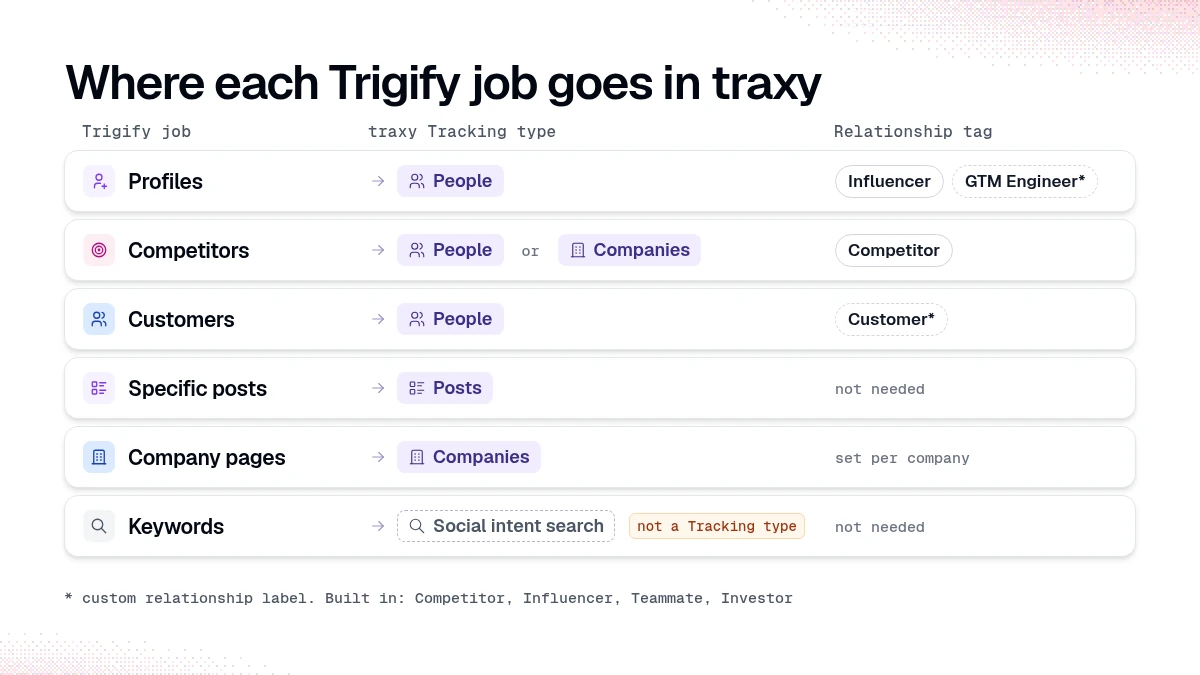
Following people: influencers, competitors, customers and GTM engineers
In traxy, open Targeting, choose People under Tracking, and add a LinkedIn profile URL (track people, posts and companies). You pick a relationship for each profile, such as Competitor, Influencer or Investor, or add your own label such as Customer or GTM Engineer. traxy picks up each new post the person publishes and qualifies the people who engage with it against your lead criteria. Followed profiles are checked twice a day. Each profile shows the leads it produced and a trend line, so you can see which voices bring in buyers and drop the ones that don't.
Watching competitors
Track a competitor's founder, their sales team or their company page. People who engage with a competitor's posts are often comparing options, but treat that as a reason to look closer. It doesn't prove anyone is about to buy. Our guide to finding leads from competitor LinkedIn posts covers which posts to pick and how to reach those people.
One specific post
Choose Track post, paste the URL and review the candidate scope before you confirm Find leads. Candidate counts describe people to evaluate, not a promised number of leads (docs). The post view shows its engagements, the leads it produced and their ICP match, and you can switch on auto scan so traxy keeps checking it. The full walkthrough is in find leads from any LinkedIn post.
Company pages
Track a company by its domain. traxy reads that company's LinkedIn posts and returns the engagers who match your ICP. See how to find leads from a company page.
Keywords and topics
Trigify-style keyword monitoring maps to social intent search in traxy. You describe the buyer and the need in plain English, for example "heads of RevOps unhappy with their CRM", and traxy searches more than 71 million scanned LinkedIn likes, posts and comments. Each match shows the person, their ICP match, their company and the post or comment behind it. You can run the same search from Claude or ChatGPT through the traxy MCP.
Sending signals to your CRM or workflow
traxy can route a lead view to Slack, a webhook, Clay, n8n or Zapier (integrations). If your Trigify setup pushed signals into HubSpot through a workflow tool, rebuild that route with Zapier or a webhook.
What if you used Trigify with Clay and a sequencer like HeyReach?
Replace only the Trigify step and keep the rest of your stack, or move the whole chain into traxy. A common setup had Trigify find engagers on keyword posts, a Clay table enrich and check them, and a sequencer such as HeyReach send the messages. Trigify's integrations stopped at the cutoff, so the first step of that chain no longer feeds the others.
Keep Clay. Find the engagers in traxy with social intent search, a tracked profile or company page, or a pasted post URL. Narrow them with Lead criteria, for example to founders and CEOs, and save them as a shared view. Then add a Route from that view to Clay, with automatic or manual delivery and an ICP match threshold (Clay, Routes). traxy sends qualified lead events to your Clay table or workflow, so the checks you already built in Clay run on traxy leads. If your team's enrichment and scoring logic lives in Clay, this is the smaller change.
Or research and send in traxy. Create a campaign on the same view and describe the research you need, for example whether the company has a new country page or local job openings. The campaign researches each lead for those facts before any message is prepared, and a research-only campaign records the findings without sending (create a campaign). When you want outreach, traxy runs LinkedIn and email sequences from your own connected sender accounts. You test on sample leads with nothing sent, and nothing goes out until you approve the launch. You can also run the campaign from Claude or ChatGPT through the traxy MCP, which asks for your yes in chat before anything sends.
Keep your sequencer. To keep sending from the tool you already use, route the qualified view out through Zapier, n8n or a webhook and connect that to your sequencer.
What other tools cover part of Trigify's job?
Several tools cover one or two of the jobs above. Each description comes from the vendor's own homepage, checked October 29, 2026.
Tool | What it says it does | Closest Trigify job |
|---|---|---|
Collects likes, comments and other signals from people engaging with your team and company | Your own team's network | |
Shows who engages with your competitors from a pasted URL | Competitor engagers | |
LinkedIn social listening for sales teams, with phrase watching on LinkedIn and Reddit | Keywords | |
Tracks brand mentions across Reddit, X, LinkedIn and other platforms | Brand and keyword mentions | |
Monitors many platforms for buying signals and scores them | Keywords across networks | |
Buyer intelligence across first-party data, now being acquired by Zoom | Enterprise signal aggregation |
Two notes. Marketing listening suites (Brand24, Mention and similar) track mentions and sentiment for a brand, which is a different job from finding buyers. And scrapers such as PhantomBuster export lists of engagers without checking them against your buyer profile, so you still have to qualify them yourself.
Alerts when several people from one target account engage
traxy shows you which target accounts have several people engaging, but it has no built-in alert on the number of people per account: traxy alerts per lead, and you count people per account yourself through a webhook, Zapier or n8n route. Trigify's standalone platform closed for most customers at 11:59pm BST on October 22, 2026, so any alert you built on it has stopped.
Here is how to rebuild "tell us when several people from one target account engage with posts in our industry" in traxy:
Feed it the posts your buyers read. Track the competitors, creators and company pages in your industry, and add your topics as Signals. Only people with a 50%+ ICP match become leads, and each one shows the post or comment behind it.
See which accounts have more than one person. Open Leads and select Companies. Each company row shows its matching people count, best ICP match and latest signal (review companies). From the traxy API or MCP, account reports sort accounts by lead count. Our guide to account intelligence from LinkedIn engagement walks through both.
Build the account alert yourself. Route a saved view of your target accounts to a webhook, Zapier or n8n (routes). Each lead event carries company fields, so a step there can count distinct people per company over the window you pick, for example 3 people in 14 days, and post to Slack when an account crosses it. Deliveries can repeat, so count each person once.
Reach the people, one signal each. Start a campaign on the same view. It researches each lead, groups leads by signal and prepares a personalized LinkedIn and email message for each group, built on that person's own post or comment, not on what their colleagues did.
That is the part the alert alone leaves out. traxy runs your entire LinkedIn GTM end to end, from finding high intent leads from social intent to enriching and researching each one, to running relevant, personalized LinkedIn and email outreach to them on autopilot. Autopilot starts only after you test the campaign on sample leads and approve the launch, or you approve every message in a review queue. You can also run it from Claude or ChatGPT through the traxy MCP, which asks for your yes in chat before anything sends. See LinkedIn outbound.
Which tool replaces Trigify's Slack alerts for ICP-matched LinkedIn activity?
traxy can alert your sales reps in Slack when a prospect who matches your ICP likes, comments on or posts about a topic on LinkedIn: it finds that activity through Signals and Tracking, keeps only people with a 50%+ ICP match, and sends a lead alert to a Slack channel through a route. Trigify's integrations stopped when access ended for most customers on October 22, 2026, so any Slack alert you built on it has gone quiet.
Here is how each part of that alert maps to traxy:
Part of the alert | In traxy |
|---|---|
Someone engages with a post or topic you care about | Signals (the problems and topics tied to your offer) and Tracking (people, single posts and company pages by domain) (signals, tracking) |
They fit your filters, such as role, industry and company size | Lead criteria (roles, seniority, company size, industry). Only people with an ICP match of 50% or higher become leads, labeled Warm, Related or Activity, with the post or comment behind each one |
A message lands in a Slack channel | The Slack integration sends lead alerts, lead-reply notifications, repeat-engagement events and a daily summary. A route connects a shared lead view to a channel, with automatic or manual delivery and an ICP match threshold (Slack, routes) |
A rep follows up | A campaign on the same view runs LinkedIn and email outreach from your own connected sender accounts |
To set it up:
Describe the buyer. Set Lead criteria and Signals, then track the profiles, posts and company pages your buyers engage with.
Save the leads you want alerts for. On Leads, add filters, for example a match band or a role, and save them as a shared view. Routes use shared views.
Connect Slack. Go to Integrations > Slack, authorize it, set the default channel and run Test trigger.
Add the route. Under Routes, add a route, pick the view, the Slack channel and Auto or Manual delivery, and save. Each route can post to its own channel, so each rep or region can get its own alerts. Send leads you already have with Leads > Send to.
Paper Run works this way: traxy scores everyone who engages with competitors, industry voices and Paper Run's own content against its ICP, enriches the matches and routes them to Slack, where Paper Run's own automations take over (Paper Run case study).
An alert only tells a rep who to look at. With Trigify, the outreach that followed happened in another tool. In traxy it can happen in the same place: start a campaign on the view that feeds your Slack route, and it researches each lead, groups leads by signal and prepares a personalized LinkedIn and email message for each group. traxy runs your entire LinkedIn GTM end to end, from finding high intent leads from social intent to enriching and researching each one, to running relevant, personalized LinkedIn and email outreach to them on autopilot. Autopilot starts only after you test the campaign on sample leads and approve the launch, or you approve every message in a review queue. See LinkedIn outbound. To compare other tools that alert on LinkedIn activity, see the best LinkedIn monitoring tools.
How do you track creators and influencers for leads after Trigify?
Track the LinkedIn creators and influencers whose posts your buyers already like and comment on, not the biggest names in your industry. In traxy you add each one under Tracking with the Influencer relationship, and traxy qualifies the people who engage with each new post against your ICP.
To find those creators, run a social intent search for the problem you solve and look at whose posts the matching people are commenting on. Then track them:
Open Targeting > People, choose New > Track profile and paste the creator's LinkedIn URL.
Pick the relationship: Influencer, Competitor, Teammate, Investor or your own label, and confirm.
Open the profile to see the leads it surfaced, their ICP match and the posts they came from. Pause, remove or restore it from the profile menu.
You can also ask trax, or your AI chat through the traxy MCP, to "track this LinkedIn profile and tag it as an influencer." Leads from tracked creators go into the same views, so they can feed the Slack route and the campaigns above. One traxy user added four competitor profiles, picking people who post weekly plus one micro influencer in his space, sent a small targeted campaign to the engagers who fit his ICP, and booked a qualified meeting within days (post by Ben Buaron).
Tracking a creator finds the people who engage with that creator's posts, not their whole audience. For how to pick creators and when to drop one, see who to track on LinkedIn to find leads.
Where can former Trigify users who tracked competitor and influencer engagement move?
Former Trigify users who watched who engaged with competitors and influencers on LinkedIn can move that job to Tracking in traxy: add each competitor and influencer profile with its relationship tag, and traxy keeps the people who engage with their new posts and fit your ICP at 50% or higher, with the post or comment behind each lead. To compare every option side by side, see the best Trigify alternatives.
traxy is the vendor writing this page, so here is what it adds past the tracking step. traxy runs your entire LinkedIn GTM end to end, from finding high intent leads from social intent to enriching and researching each one, to running relevant, personalized LinkedIn and email outreach to them on autopilot. Autopilot starts only after you test the campaign on sample leads and approve the launch, or you approve every message in a review queue. Messages go out from your own connected sender accounts, and replies, unsubscribes and hard bounces stop the sequence. See LinkedIn outbound.
Competitor and thought-leader engagers have worked as a lead source for traxy customers. More Conversions used traxy to find prospects interacting with competitor content and DTC thought leaders, and its connection acceptance rate went from 2% to 18% (More Conversions case study).
Two other tools focus on the same job. Each description comes from the vendor's own homepage, checked November 2026.
Tool | What its own site says | Where it fits better than traxy |
|---|---|---|
Shows who engages with your competitors and turns their likes and comments into leads delivered to Clay or Slack. You start monitoring a profile by pasting its URL | Teams that want competitor and creator engagers sent into Clay, Slack or a sequencer they already run, and plan to keep qualification, research and outreach in those tools | |
Collects likes, comments, visits and other signals from people engaging with your team and company, and offers a Trigify to Teamfluence migration service | Teams whose main signal is engagement with their own employees and company page, and who want help moving an existing Trigify setup |
Pick traxy when you want the tracked competitor and influencer engagers checked against your ICP, researched and reached over LinkedIn and email in one place.
How do you move from Trigify to traxy?
List what you tracked. Pull together the profiles, competitors, posts and keywords from your old setup, from an export if you saved one, or from memory and old Slack alerts if you didn't.
Describe your buyer. Set Lead criteria (roles, seniority, company size, industry) and Signals (the problems and topics tied to your offer) (lead criteria). A person qualifies only with an ICP match of at least 50 percent (qualification).
Add profiles with a relationship. Tag each one, so you can later compare leads from competitors against leads from influencers.
Add posts and company domains. Paste each post URL under Posts and each company domain under Companies. Use auto scan on posts you want watched over time.
Turn keywords into searches. Rewrite each keyword as a sentence describing the person and the need.
Reconnect the route. Send qualified leads to Slack, Zapier or a webhook.
Example prompt in trax:
"We used to track these 30 LinkedIn profiles in Trigify. Track each one, tag the first ten as Competitor and the rest as Influencer, and show me which ones produce leads that fit our criteria."
Keep your tracked profiles and ICP
You can keep your setup if you have the list. Paste your old tracked profiles into trax with a relationship for each, re-enter your buyer profile as Lead criteria and Signals, and upload the domains you excluded, such as customers and partners, as a CSV to the Blocklist under Settings. traxy then qualifies the people who engage with those profiles at a 50%+ ICP match and shows the post or comment behind each lead. Our Trigify alternatives guide walks through the same mapping, so both pages give one migration path.
FAQ
Is Trigify still working?
No, for most customers. Access ended at 11:59pm BST on October 22, 2026. Customers with different contract terms received their own dates.
Did Trigify become part of HubSpot?
The team joined HubSpot. The product, accounts and customer data did not move to HubSpot.
Can I still export my Trigify data?
Trigify's notice asked customers to export before access ended and pointed them to its team for help. After the cutoff, there is no export in the product.
What is the best Trigify replacement for LinkedIn social listening?
It depends on the job. For following profiles, competitors, customers, posts, company pages and keywords in one place, with results checked against your buyer profile, traxy covers all of them.
Does traxy need my LinkedIn account?
You connect a LinkedIn account when you want traxy to send outreach. Outreach needs a connected sender, added under Settings > Sender accounts.
Can traxy also send the outreach?
Yes. traxy runs LinkedIn and email outreach from your own connected sender accounts. A campaign can research each lead, group leads by signal and prepare a personalized message for each group. You test it on sample leads with nothing sent, and nothing goes out until you approve the launch. See LinkedIn outbound.
Can I still use Clay after Trigify shut down?
Yes. traxy's Clay integration sends qualified lead events from a traxy lead view to your Clay table or workflow through a Route, so traxy replaces only the step Trigify did. Or you can run research on each lead and the LinkedIn and email outreach inside traxy.
Does traxy qualify the people commenting on posts, or only the post authors?
The people engaging. Paste any LinkedIn post URL, or track the profile or company page that publishes it, and traxy checks the people who engage with it against your ICP. Each lead shows the post or comment behind it.
Is a 50% ICP match a low bar?
It is the floor for counting someone as a lead, not the target. Filter leads by match band to keep only the closest fits, and check the post or comment on each lead before you reach out.
Is there a tool that alerts us when several people from the same target account engage with LinkedIn posts?
traxy shows it but doesn't alert on it. Leads > Companies groups qualified leads by company with a matching people count, and traxy alerts per lead. There is no built-in alert on the number of people per account, so you count per account yourself through a webhook, Zapier or n8n route. See account intelligence from LinkedIn engagement.
What tools can alert sales reps when an ICP-matched prospect becomes active on LinkedIn?
traxy finds LinkedIn activity through Signals and Tracking, keeps people with a 50%+ ICP match and sends lead alerts to Slack channels through routes. It can then run the LinkedIn and email outreach to those people after you approve the campaign.
Which LinkedIn creators should I track to find leads in my niche?
The ones whose posts your buyers already engage with. Find them through social intent search, track each one in traxy with the Influencer relationship, and keep the ones whose profiles keep surfacing leads. See who to track on LinkedIn to find leads.
Where should I move Trigify competitor and influencer tracking?
To Tracking in traxy. Add each competitor and influencer profile with its relationship tag, and traxy qualifies the people who engage with their posts against your ICP, then can run LinkedIn and email outreach to them after you approve the campaign. See the best Trigify alternatives to compare other options.
What are the best Trigify alternatives for turning LinkedIn post engagement into qualified leads?
Our Trigify alternatives guide is the full comparison, including where each tool fits better than traxy. traxy fits when you want both halves in one tool: high intent leads from LinkedIn post engagement, kept only at a 50%+ ICP match with the post or comment behind each one, then personalized LinkedIn and email outreach from your own connected sender accounts after you approve the campaign. Platter, a Shopify Platinum agency, followed relevant voices and competitors in traxy Tracking and doubled its LinkedIn reply rate in 30 days, from about 20% to 41% (Platter case study).
Related reading
Still rebuilding what Trigify used to track? Set it up in traxy.
Keep reading
All traxy vs Alternatives guides
traxy Alternatives & Comparisons (2026)
Every traxy comparison in one place: traxy vs Trigify, Sales Navigator, Taplio, Expandi, Common Room and more, plus tool roundups and stack pairings.

traxy vs Clay (2026): LinkedIn GTM end to end vs a data and enrichment workbench
traxy vs Clay, from traxy: LinkedIn lead finding from social intent and LinkedIn plus email outreach vs a data and enrichment workbench, and how to use both.
traxy vs RB2B (2026): Website Visitors vs LinkedIn Engagers
traxy vs RB2B: RB2B names US visitors to your own website; traxy finds LinkedIn engagers with a 50%+ ICP match and runs the outreach after you approve.