
Outbound not working? Test the list before you rewrite the copy
When outbound stops getting replies, keep the offer, sender and message the same and send to two lists. If the new list replies more, fix the list.
When outbound stops getting replies, test the list before you rewrite the copy. Keep the offer, the sender and the message the same, and send to two lists: the one you have now, and one built from people who fit your best clients and have shown recent, relevant activity. If the second list gets more replies with the same words, the problem was who you were contacting.
Why do teams rewrite the copy first?
Copy is the easiest thing to change. It sits in a document, everyone has an opinion on it, and a new version feels like progress. The list is harder. It came from a database export or a title search, and rebuilding it takes work.
So the usual cycle looks like this: replies drop, the team writes a new opener, sends it to the same kind of list, gets a similar result, and writes another opener. Each round changes the variable that was easiest to change and leaves alone the one that may be causing the problem.
In a video this week, Adam Salmanov, who builds traxy, described what works for his team as "reaching out to the person that you can help the most at the right time." The list decides who that person is. The copy only works on the people the list gives it.
How do you know the list is the problem?
You do not know until you test it. Some signs point that way:
Acceptance or open rates are fine, and replies are low. People see the message and it does not apply to them.
The replies you do get are "not relevant" or "we don't do that."
The list came from job titles alone, such as "Founder" or "Head of Growth" with a company size filter.
A good share of the people on it have not posted or engaged with anything on LinkedIn in months.
A title match tells you what someone is called. It does not tell you whether they are active on LinkedIn, whether they are in your market right now, or whether your offer fits their company.
How do you run the list test?
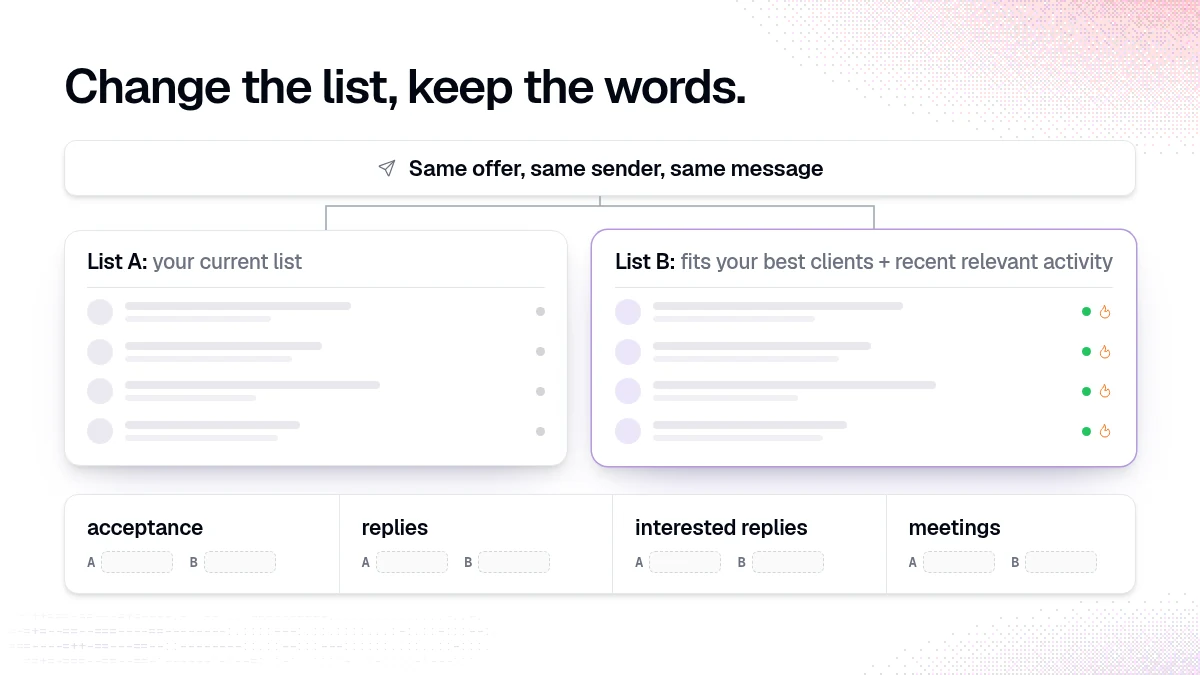
Change one thing. Everything else stays fixed.
Keep the same | Change |
|---|---|
Offer | The list |
Sender (same LinkedIn account or mailbox) | |
Message templates and steps | |
Sending days and times |
1. Describe your best clients
Write down what your three to five best clients had in common when they bought. Use traits you can check: role of the buyer, company size, industry, the kind of work they were doing, and the topics they were talking about. Adam's example from the same video is an ecommerce agency that knows a certain size of brand, in a certain category, with a certain team size, tends to close and stay. Those traits become your criteria.
2. Turn them into lead criteria and signals in traxy
Open Lead criteria and enter the people and company traits: roles, seniority, company size, industry and the niche keywords that separate a buyer from a broad audience (lead criteria). Then open Signals and describe the problems and topics your best clients were engaging with before they bought (signals).
Example prompt in trax:
"Here are our three best clients and why they bought: {notes}. Review our lead criteria and signals and suggest changes so new leads look more like them."
Review the proposed values before you approve anything. A suggestion is not a saved change.
3. Build list B from people who fit and are active
Ask trax for new leads, or follow the LinkedIn profiles and posts your buyers engage with. Each qualified lead has an ICP match of at least 50 percent and a recorded signal (how qualification works). Filter to the people with a Warm or Related signal and save them as a shared view, for example "List B: best-client lookalikes."
"Show me warm leads at {industry} companies with {size} employees."
Some traits from your best-client notes, like how much a brand spends on ads, may not be something traxy records. You can ask for research facts when you create a campaign, and the campaign test will show which facts the research could support (create a campaign).
4. Send both lists the same campaign
Use the same templates for list A and list B. In traxy, you can create one campaign per list with identical steps and the same sender. A lead can only be in one active sequence at a time, so check that nobody appears on both lists (sequences). Test each campaign and review the previews before you approve the launch (review and launch).
5. Compare the right numbers
Wait until both lists have had the full sequence. Then compare:
acceptance rate (LinkedIn)
reply rate
share of replies that are interested
meetings booked
Count meetings from your calendar. In traxy, Outbound > Meetings shows meetings attributed to your leads once Google Calendar is connected (meetings). Keep the numbers separate. A delivered message is not a reply, and a reply is not a meeting.
How big should each list be?
Big enough that a few replies either way do not decide the result. With small lists, one enthusiastic reply can make a list look better than it is. If you can only build a small list B, run the test for longer instead of drawing a conclusion from the first week.
What if list B does no better?
Then the list may not be the problem, and the copy or the offer deserves the next test. That is a useful result. You learned it with one test instead of five rewrites.
Check a few things before you move on:
Did list B match your best clients? Open ten leads and read them. If they do not look like your best clients, fix the criteria and run it again.
Did the message fit list B? A message written for a generic title list can be too vague for people who have a specific signal. The observation in the first line should match the evidence.
Was the offer the same? A changed offer breaks the test.
How does this connect to the message?
Once the list is right, the message gets easier to write. When everyone in a campaign is the same kind of person with the same kind of signal, you can write for their situation. Adam's outbound guide uses four parts for every message: an observation from the signal, what it means for them, something useful you can offer, and an ask they can answer with one word (the personalized LinkedIn outbound guide).
You write the template. Research fills the slots, such as the topic someone engaged with. Check every preview against the research before launch.
FAQ
Why is my cold outreach getting no replies?
The common causes are the list, the offer and the message. Test the list first with the same offer, sender and message, because it is the input most teams change least.
What is a better lead list for outbound?
A list of people who fit the traits of your best clients and have shown recent activity related to your offer, such as engaging with posts on the problem you solve.
Should I use a new sender for list B?
No. A different sender changes two things at once. Keep the sender fixed.
Can I run this test outside traxy?
Yes. The method works with any tool. traxy helps with building list B from fit and LinkedIn activity, and with running both campaigns from one place.
How many test lists should I run?
Two. Your current list and one new list. Add a third only after you have a clear result from the first pair.
Related reading
Want to build list B from people who fit and are active? Start with traxy.
Keep reading
All Prospecting & Outreach guides
LinkedIn Prospecting (2026): How to Prospect on LinkedIn Step by Step, With Message Examples & Signals That Tell You Who to Contact First
How to prospect on LinkedIn step by step: profile, ICP, list building, message examples, signals, prospecting tools and every outreach guide we publish.
From a LinkedIn signal to a message you can back up
Match the message to what the person did: reply to a comment, use a post topic as context, or send a plain role-based intro. Examples and traxy setup.
How to follow up on LinkedIn post engagement with a LinkedIn and email sequence
Follow up on LinkedIn post engagement with one sequence: a connection request, a message after they accept, and an email if there is no reply.