
How to follow up on LinkedIn post engagement with a LinkedIn and email sequence
Follow up on LinkedIn post engagement with one sequence: a connection request, a message after they accept, and an email if there is no reply.
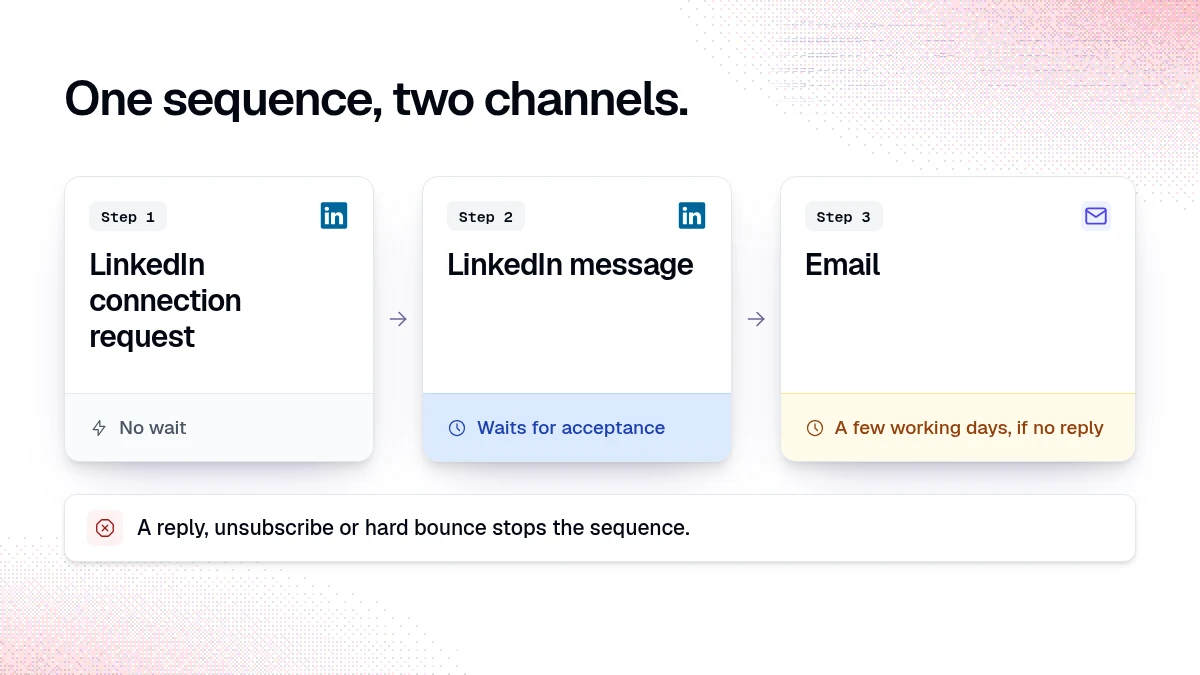
To follow up on LinkedIn post engagement across two channels, save the qualified people from the post as one audience, write a short template for each step, and run them as one sequence: a LinkedIn connection request, a LinkedIn message after they accept, and an email later for people who have not replied. In traxy you set this up as a campaign with trax, test it, and approve the launch. A reply stops the sequence.
Why use LinkedIn and email together after someone engages with a post?
A person who engaged with a post about your topic is already on LinkedIn and already thinking about the problem. LinkedIn is the natural first channel. Some people accept the connection and rarely check their LinkedIn messages. Others reply faster on email. A second channel gives your follow-up a better chance of being seen without sending more messages on one channel.
The order matters. The post happened on LinkedIn, so the first touch belongs there. Email comes later, as a follow-up for people who have not replied, and it should read like a follow-up from the same person.
What do you need before you build the sequence?
Three things:
A qualified audience from the post. Open the post in traxy and review its qualified leads. If the post is not in your workspace yet, add it by its link. Each lead shows role, company, ICP match and the signal behind it. A lead qualifies at an ICP match of at least 50 percent (how qualification works).
A sender with both channels. In Settings > Sender accounts, connect a LinkedIn account and a mailbox under the same sender name. A sequence that uses LinkedIn and email needs a sender name with both channels connected (sender accounts).
Templates you wrote yourself. One per step. The research fills named slots, such as the topic of the post. The wording is yours.
Finding the leads does not need a LinkedIn connection. Sending does.
How do you set it up in traxy, step by step?
1. Save the audience as a shared view
Open Leads, filter to the people from the post, and save the result as a shared view. A view saved while a post's lead scope is selected keeps that scope (saved views). Remove anyone you would not message in person: peers, competitors, existing customers. Mark them as a bad fit with a reason so your feedback is on record.
Example prompt in trax:
"Show me the qualified leads from this post: {post link}. Sort by ICP match."
2. Ask trax to create the campaign
Open trax or Outbound > Campaigns and describe the audience, the offer and the outcome you want (create a campaign). Be specific about the research each step needs.
"Create a campaign for the shared view 'Post: first sales hire'. Research what each person's company sells and whether they have a sales team today. Use my templates below. Steps: LinkedIn connection request, LinkedIn message after they accept, email follow-up if there is no reply."
trax proposes the audience, the research and the steps, and asks about anything missing.
3. Set the waits
Each step has a wait before it. A wait can depend on an event such as connection acceptance (sequences). Send the first LinkedIn message soon after the person accepts, while your profile is fresh in their mind. Give the email step a few working days after that.
4. Test before launch
Ask trax to test the plan. The test prepares research and a preview for each sampled lead without sending anything (review and launch). Read the previews against the research. If a slot is filled with something the research does not support, change the template or drop that slot.
5. Review and launch
Open Launch and check who joins, who is excluded because another unfinished campaign holds them, who a completed campaign has contacted before, the sender, the steps and the delivery mode. Confirming Launch is the approval. If your delivery mode requires approval, each message also waits in the campaign's review queue until you approve it.
What should each step say?
Use the same four parts in every step: an observation, what it means for them, something useful you can offer, and an ask they can answer in one word. The observation comes from the post they engaged with. Keep it about the topic and avoid making a point of the like itself.
The examples below are illustrations, not results. Slots are in braces.
Step 1, LinkedIn connection request (optional note):
"Hi {first_name}, I post about {post_topic} and saw you're in the middle of it at {company}. Happy to connect."
Step 2, LinkedIn message after they accept:
"Thanks for connecting, {first_name}. We put together a short checklist on {post_topic} for {company_type} teams. Want me to send it over?"
Step 3, email if there is no reply:
"Subject: {post_topic} checklist
Hi {first_name}, I sent this on LinkedIn too, in case email is easier. The checklist covers {one_concrete_item}. Want it?"
The email includes your sender signature when you have one. LinkedIn messages do not use it.
Step | Channel | Wait before it | Job of the step |
|---|---|---|---|
1 | LinkedIn connection request | None | Get into their network with a relevant reason |
2 | LinkedIn message | After acceptance | Offer something useful tied to the post topic |
3 | A few working days, no reply | Reach the people who do not read LinkedIn messages |
What stops the sequence?
Replies, unsubscribe requests and hard bounces stop active outreach (sequences). A lead can be in only one active sequence at a time, and campaigns run in priority order, so the same person is not messaged by two unfinished campaigns at once (manage campaigns).
Sender limits, active hours and ramp-up settings also apply. A campaign does not bypass them, so a step can wait after you approve it. Check the lead's status before you resend anything. May have been sent is different from Not sent, and an uncertain result should not be repeated without checking.
Where do replies go?
Replies from both channels land in Outbound > Inbox, one conversation per lead (Inbox). The details pane shows the campaign and where the lead is in the sequence. If you want to handle a conversation yourself, pause that lead's enrollment from the conversation. If your team works in Slack, lead-reply notifications can go to a Slack channel (Slack).
When a reply turns into a meeting, connect Google Calendar and record the outcome in Outbound > Meetings (meetings). A delivered message is not a reply, and a reply is not a meeting, so keep them as separate numbers.
What are the limits?
Engagement is not intent to buy. A reaction shows interest in a topic. It says nothing about budget or timing. Keep the wording proportional to the evidence.
Email needs contact data. Email lookup is not guaranteed to find an address. Check the saved result before you count on the email step (contact details).
LinkedIn has its own rules. Read LinkedIn's terms for your account and keep volumes at levels you are comfortable with.
A test is not a send. A successful test means the previews were prepared. Nothing goes out until you launch.
FAQ
Should the first touch be LinkedIn or email?
LinkedIn, when the reason for reaching out is a LinkedIn post. Email works as the follow-up for people who have not replied.
Can I mention that they liked my post?
Mention the topic. A line about the like itself tends to read as surveillance and adds little.
Does a reply on email stop the LinkedIn steps too?
Replies stop active sequence outreach for that lead. Check the conversation in Inbox to see its state.
Does trax write my messages?
You write the templates. trax runs the research you asked for and fills the slots, and you check every preview in the test before launch.
Can I run the same sequence for a competitor's post?
Yes, if the people engaging with it fit your criteria. Change the observation so it fits that post's topic.
What if no one from the post qualifies?
Check whether the post's audience matches your lead criteria and whether processing has finished. See no new qualified leads.
Related reading
Ready to try it on one of your own posts? Start with traxy.
Keep reading
All Prospecting & Outreach guides
LinkedIn Prospecting (2026): How to Prospect on LinkedIn Step by Step, With Message Examples & Signals That Tell You Who to Contact First
How to prospect on LinkedIn step by step: profile, ICP, list building, message examples, signals, prospecting tools and every outreach guide we publish.
From a LinkedIn signal to a message you can back up
Match the message to what the person did: reply to a comment, use a post topic as context, or send a plain role-based intro. Examples and traxy setup.
Outbound not working? Test the list before you rewrite the copy
When outbound stops getting replies, keep the offer, sender and message the same and send to two lists. If the new list replies more, fix the list.